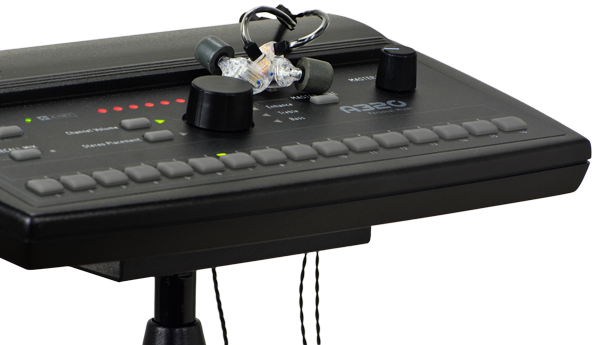
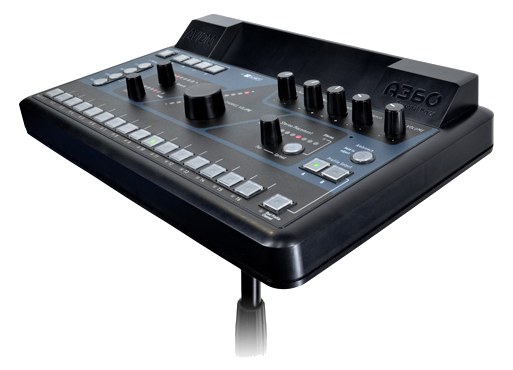
The Aviom A320 is a 16-channel personal mixer using Aviom's proprietary A-Net protocol, offering musicians hands-on control of their monitor mix. It has been a staple in worship and theater environments for years and works with any console that has an Aviom output card or a standalone A-Net distribution hub. The build quality and tactile controls make it feel more professional than budget alternatives.
~$499Use retailer rows for current price and stock
01 · What it does—and what that changes in your rig.
Product overview
Start with the payoff, then work through how it functions, where it fits, and the details that change a real build.
The payoff
Personal Mixer decisions, organized around the whole rig.
The A320 is Aviom's mid-tier personal mixer in their A-NetAviom’s personal-mixer protocol — channels ride Cat5 from a distributor to each player’s mixer. The original mix-your-own-ears system. ecosystem — a desktop unit that gives a musician direct, hands-on control over their own monitor mix without tying up a console auxAn auxiliary mix output — each aux is its own independent blend of the channels, typically one per monitor mix or effects send. or requiring an engineer to chase every 'more me' request. It pulls 16 channels of digital audio off a single Cat5Standard network cable grades. In an audio rig one cheap Cat5e run can replace a 48-channel copper snake; AES50 wants it shielded. cable, lets the player blend and pan to taste through dedicated knobs and buttons, and sends stereo analog out to their IEMIn-Ear Monitor — earpieces that replace floor wedges, feeding each player their own mix. The reason this whole rack exists. transmitter or wedgeA floor monitor speaker angled up at the performer — the thing IEMs replace, and the thing you fall back on when they die. amp. It is not a standalone device: it only works inside an Aviom A-Net signal chain, fed by a console with a compatible output card or an A-Net distribution hub.
Documented outputs
33 destination connections
Required cable runs
1RJ45
Rack space
Outside rackPlan a shelf, tray, or stage position
Photo: AviomOutside rack · 8W
Function
How it works in the path
Eight watts of draw and 0.8 kg mean the A320 asks almost nothing of your rig physically, but the A-NetAviom’s personal-mixer protocol — channels ride Cat5 from a distributor to each player’s mixer. The original mix-your-own-ears system. Thru port is where this unit earns its place in a larger setup — you can daisy-chain multiple A320s on a single Cat5Standard network cable grades. In an audio rig one cheap Cat5e run can replace a 48-channel copper snake; AES50 wants it shielded. run, which keeps your cable count sane across a wide stage. The quarter-inch TRSTip-Ring-Sleeve — a 1/4″ jack with three contacts carrying a balanced signal or a stereo pair. A guitar plug with one extra ring. stereo outputs are line-levelThe strong signal that runs between pieces of gear (about a volt) — hotter than mic level, far below speaker level., so they feed directly into a transmitter's line input without a DIDirect Injection box — converts an instrument’s unbalanced signal to a balanced mic-level XLR so it can run long cables without noise. or preampThe gain stage that lifts a mic’s tiny signal up to line level — the first thing a signal hits, and a big part of how a console sounds. in between. Sixteen channels is enough for most working bands and theater pits; where it starts to feel tight is on large broadcast or festival stages where you want stemsSub-mixes of a session grouped by instrument (drums, keys, vocals) — how playback rigs run tracks with live control over each group., effects returns, and click all as discrete channels simultaneously.
Best fit
Where it earns its place in the system
The A320 belongs in a rig that is already committed to Aviom, or one being built from scratch around A-NetAviom’s personal-mixer protocol — channels ride Cat5 from a distributor to each player’s mixer. The original mix-your-own-ears system.. It fits worship bands, theater productions, and club-touring acts where musicians want personal control and the production has a console with an Aviom card in place. If your console outputs DanteThe most common audio-over-network standard: dozens of channels of uncompressed digital audio down one ordinary Ethernet cable between Dante boxes. or MILANAudio Video Bridging — open network audio (MOTU, PreSonus) where the switch reserves bandwidth so streams can’t glitch. Milan is its pro profile. rather than A-Net, you're looking at a bridge device before this becomes viable — at that point, competing personal mixer ecosystems built natively around those protocols may be a cleaner solve. Budget acts weighing cost should also know this is the $499 entry point into a proprietary ecosystem, so factor in the full chain cost before committing.
In the rack
Details worth deciding before load-in.
Run Cat5eStandard network cable grades. In an audio rig one cheap Cat5e run can replace a 48-channel copper snake; AES50 wants it shielded. or Cat6 for your A-NetAviom’s personal-mixer protocol — channels ride Cat5 from a distributor to each player’s mixer. The original mix-your-own-ears system. loop — standard Cat5 works but you'll have less headroomThe margin between your normal level and where things clip — headroom is what absorbs the snare hit you didn’t see coming. against interference on longer stage runs, and the upgrade costs almost nothing.
The A-NetAviom’s personal-mixer protocol — channels ride Cat5 from a distributor to each player’s mixer. The original mix-your-own-ears system. Thru port lets you daisy-chain units, but plan your chain order intentionally: put the player who needs the most reliable signal (usually the drummer or musical director) closest to the hub, not at the tail of a long chain.
The TRSTip-Ring-Sleeve — a 1/4″ jack with three contacts carrying a balanced signal or a stereo pair. A guitar plug with one extra ring. outputs are line-levelThe strong signal that runs between pieces of gear (about a volt) — hotter than mic level, far below speaker level. — confirm your IEMIn-Ear Monitor — earpieces that replace floor wedges, feeding each player their own mix. The reason this whole rack exists. transmitter's input is set to line, not mic, before handing it to the musician, or you'll hand them a distorted mix and a very confused artist.
The A320 is desktop-only out of the box; if a musician wants it rack-adjacent or fixed to a keyboard stand, Aviom and third-party brackets exist — worth sourcing before load-in rather than gaff-taping it to a stand on site.
02 · Know the whole path before you buy.
Signal path
Learn the route as a block diagram: source, product function, transport, and destination. Select any block to see what enters, what changes, and what leaves.
Interactive block diagramAuto-looping · hover, focus, or tap to hold a stage
Port-type signalProduct functionSystem boundary
Follow one signal from source to destination
Each block answers the same three questions: what arrives, what changes here, and what leaves.
01 · Source · selected
RJ45
RJ45
RJ45 + ¼-inch TRS
01 · Source
1 documented input
RJ45
Arrives as
1 documented input
Connector
RJ45
Signal
digital audio
03 · What this product asks of the rest of the system.
Compatibility
Treat connector names as the start of the check—not the answer. These are the boundaries that determine a complete working path.
Best fit · Personal Mixer
Use it as personal mixer tracked outside rack rails; follow the manufacturer’s mounting and form-factor guidance.
Plan the companion path
Complete the path with upstream and downstream gear that matches connector, direction, signal type, protocol, and wiring standard.
Connector boundary
Documented connectors: RJ45, ¼-inch TRS. Match connector, direction, and signal type—not shape alone.
04 · Every connector, grouped by job.
I/O ports
Switch the product view and the documented port inventory updates with it—hardware and data stay side by side.
Every connector, grouped by job.
Switch panels to keep the hardware view and the documented port list in sync.
Front panelRear panel
All documented ports for Aviom A320 Personal Mixer
Port
Panel
Connector
Direction
Signal
Channels
A-Net In (RJ45)
rear
RJ45
input
digital audio
16
A-Net Thru (RJ45)
rear
RJ45
output
digital audio
16
Output L (TRS)
rear
¼-inch TRS
output
analog audio
—
Output R (TRS)
rear
¼-inch TRS
output
analog audio
—
Showing 4 of 4 documented physical ports.
05 · Compare the decision, not just the price.
Alternatives
The rows are organized around fit, power, I/O, and system role so a cheaper unit cannot hide a more expensive workflow.
A320The Aviom A320 is a 16-channel personal mixer using Aviom's proprietary A-Net protocol, offering musicians hands-on control of their monitor mix. It has been a staple in worship and theater environments for years and works with any console that has an Aviom output card or a standalone A-Net distribution hub. The build quality and tactile controls make it feel more professional than budget alternatives.View gear →
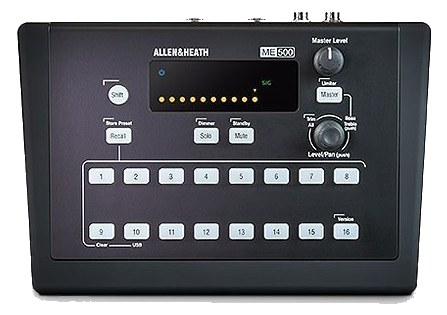
ME-500The Allen & Heath ME-500 is a compact personal mixer that pairs with A&H consoles via Monitor Mixer or M-Series mode. Sixteen stereo groups, sliders for level, and per-channel pan give performers full control of their monitor mix on stage. A common pickup for in-ear setups in churches and theaters running A&H consoles.View gear →
06 · Resolve the questions that can change the purchase or build plan.
Planning questions
Short, source-backed answers surface rack fit, power, cabling, and connection details before they become surprises.
Where does the Aviom A320 Personal Mixer live in a complete rig?
The catalog assigns it no rack units. Builder tracks it as non-rack gear; follow the manufacturer’s mounting, case, and form-factor guidance.
How much power does the Aviom A320 Personal Mixer draw?
Typical draw is 8W and documented maximum draw is 10W.
What connections does the Aviom A320 Personal Mixer have?
4 documented physical ports, including A-Net In (RJ45), A-Net Thru (RJ45), Output L (TRS), Output R (TRS).
07 · See this gear inside a complete system plan.
Builder preview
Builder keeps non-rack gear in the same bill of materials, budget, dependency, and connection plan as the rack-mounted system around it.Open in Builder