The Hear Back Mix Hub is a rack-mount distribution hub that takes eight channels of analog audio via DB25 and distributes them to multiple personal mixer stations over Cat5 cabling. Each musician gets their own Hear Back mixer to create a custom blend, while the hub handles the conversion and distribution from a single 1U rack space. It is a cost-effective personal monitoring solution that scales well for bands of up to eight musicians.
~$999Use retailer rows for current price and stock
01 · What it does—and what that changes in your rig.
Product overview
Start with the payoff, then work through how it functions, where it fits, and the details that change a real build.
The payoff
Headphone Amp decisions, organized around the whole rig.
The Hear Back Mix Hub is the rack-side brain of a personal monitoring system built around giving musicians individual control over their own ear mix. It lives in your monitor rack or IEMIn-Ear Monitor — earpieces that replace floor wedges, feeding each player their own mix. The reason this whole rack exists. rig, accepts eight channels of analog audio over a single DB25A 25-pin D-shaped connector carrying 8 channels of analog or AES audio in one multicore — the Tascam pinout is the de-facto standard. connection from your console or patch bayA panel of front-facing jacks wired to everything behind it — re-route any signal with a short cable instead of climbing behind the rack., and then pushes that audio out to up to four personal mixer stations via Cat5Standard network cable grades. In an audio rig one cheap Cat5e run can replace a 48-channel copper snake; AES50 wants it shielded. cabling. Each musician plugs into one of those stations and builds their own blend without touching the monitor desk. For a band that's tired of the 'more me' conversation mid-set, this is a real answer.
Documented outputs
44 destination connections
Documented inputs
2Based on documented inputs
Rack space
1UBuilder checks available rail space
Hear Technologies product panel1U · 15W
Function
How it works in the path
The DB25A 25-pin D-shaped connector carrying 8 channels of analog or AES audio in one multicore — the Tascam pinout is the de-facto standard. input is the connector to plan around — you'll need your console's direct outs or aux sendsAn auxiliary mix output — each aux is its own independent blend of the channels, typically one per monitor mix or effects send. wired to a DB25 breakoutA cable that splits one multichannel connector (like a DB25) into individual plugs — the octopus that turns 8 channels into 8 XLRs., which is standard gear if you're already living in the analog sub-snakeA multicore cable bundling many channels into one stage-to-console run. A sub-snake collects one corner of the stage into a drop box. world but worth accounting for if you're not. At 1UThe standard slice of rack height: 1U = 1.75″. A 3U box takes three slices; half-rack gear pairs two units side by side in one. and 200mm deep, it fits comfortably in a shallow rack, and the 15-watt draw is negligible on a standard outlet. The four Cat5Standard network cable grades. In an audio rig one cheap Cat5e run can replace a 48-channel copper snake; AES50 wants it shielded. outputs mean you can cover up to four stations from this hub, with each station then supporting individual headphone monitoring for one musician. If your band has more than four players who all want personal mixes, you'll need to think about how you're assigning outputs.
Best fit
Where it earns its place in the rack
This hub earns its place in smaller touring and rehearsal rigs — think a four- to eight-piece band where musicians are done fighting over wedgeA floor monitor speaker angled up at the performer — the thing IEMs replace, and the thing you fall back on when they die. levels and the monitor engineer is done babysitting mix tweaks between songs. It's a clean, low-overhead solution at a price point that makes the whole Hear Back ecosystem accessible. It is not the right tool if your show demands more than eight discrete mix channels per musician, or if your musicians need stereo in-ear capability with full wireless freedom — for that, you're in dedicated IEMIn-Ear Monitor — earpieces that replace floor wedges, feeding each player their own mix. The reason this whole rack exists. transmitter territory. But for wired personal monitoring in a fixed or fly-date rig, it delivers exactly what it promises.
In the rack
Details worth deciding before load-in.
Wire your console's direct outputs or aux sendsAn auxiliary mix output — each aux is its own independent blend of the channels, typically one per monitor mix or effects send. to a DB25A 25-pin D-shaped connector carrying 8 channels of analog or AES audio in one multicore — the Tascam pinout is the de-facto standard.snakeA multicore cable bundling many channels into one stage-to-console run. A sub-snake collects one corner of the stage into a drop box. ahead of load-in — showing up with a pigtailA cable that splits one multichannel connector (like a DB25) into individual plugs — the octopus that turns 8 channels into 8 XLRs. and adapters wastes soundcheck time and introduces fragile connections.
Label each Cat5Standard network cable grades. In an audio rig one cheap Cat5e run can replace a 48-channel copper snake; AES50 wants it shielded. run at both ends before the cable leaves the rack; on a dark stage with four identical RJ45 ports, unlabeled cables become a troubleshooting problem fast.
Keep Cat5Standard network cable grades. In an audio rig one cheap Cat5e run can replace a 48-channel copper snake; AES50 wants it shielded. runs away from power cable bundles where possible — even though the signal is relatively robust, long parallel runs next to AC can introduce noise into the system.
If you're only using three musician stations, leave the fourth Cat5Standard network cable grades. In an audio rig one cheap Cat5e run can replace a 48-channel copper snake; AES50 wants it shielded. port capped and reserve that position for a tech or MD who wants to monitor the mix without standing at the desk.
02 · Know the whole path before you buy.
Signal path
Learn the route as a block diagram: source, product function, transport, and destination. Select any block to see what enters, what changes, and what leaves.
Interactive block diagramAuto-looping · hover, focus, or tap to hold a stage
Port-type signalProduct functionSystem boundary
Follow one signal from source to destination
Each block answers the same three questions: what arrives, what changes here, and what leaves.
01 · Source · selected
db25 + IEC C14
RJ45
01 · Source
2 documented inputs
db25 + IEC C14
Arrives as
2 documented inputs
Connector
db25 + IEC C14
Signal
analog audio
03 · What this product asks of the rest of the system.
Compatibility
Treat connector names as the start of the check—not the answer. These are the boundaries that determine a complete working path.
Best fit · Headphone Amp
Use it when 1U and 200 mm of depth fit the case.
Plan the companion path
Complete the path with upstream and downstream gear that matches connector, direction, signal type, protocol, and wiring standard.
Connector boundary
Documented connectors: db25, RJ45, IEC C14. Match connector, direction, and signal type—not shape alone.
04 · Every connector, grouped by job.
I/O ports
Switch the product view and the documented port inventory updates with it—hardware and data stay side by side.
Every connector, grouped by job.
Switch panels to keep the hardware view and the documented port list in sync.
Front panelRear panel
All documented ports for Hear Technologies HB-Mix Hub
Port
Panel
Connector
Direction
Signal
Channels
Input 1-8 (DB25)
rear
db25
input
analog audio
8
Cat5 Out 1
rear
RJ45
output
digital audio
—
Cat5 Out 2
rear
RJ45
output
digital audio
—
Cat5 Out 3
rear
RJ45
output
digital audio
—
Cat5 Out 4
rear
RJ45
output
digital audio
—
Power (IEC)
rear
IEC C14
input
power
—
Showing 6 of 6 documented physical ports.
05 · Compare the decision, not just the price.
Alternatives
The rows are organized around fit, power, I/O, and system role so a cheaper unit cannot hide a more expensive workflow.
Hear Back Mix HubThe Hear Back Mix Hub is a rack-mount distribution hub that takes eight channels of analog audio via DB25 and distributes them to multiple personal mixer stations over Cat5 cabling. Each musician gets their own Hear Back mixer to create a custom blend, while the hub handles the conversion and distribution from a single 1U rack space. It is a cost-effective personal monitoring solution that scales well for bands of up to eight musicians.View gear →
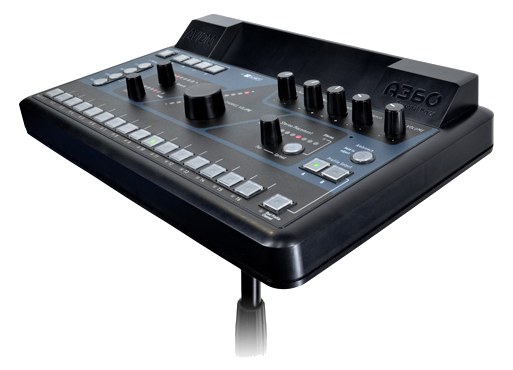
A360The Aviom A360 is a professional 36-channel personal mixer that gives musicians extensive control over their monitor mix with dedicated per-channel volume, pan, tone, and grouping. Its Pro16e networking carries all 36 channels over a single Cat5 cable, keeping stage wiring clean. This is a significant step up from basic personal mixers and is well-suited for demanding musicians who want studio-grade mix control on stage.View gear →
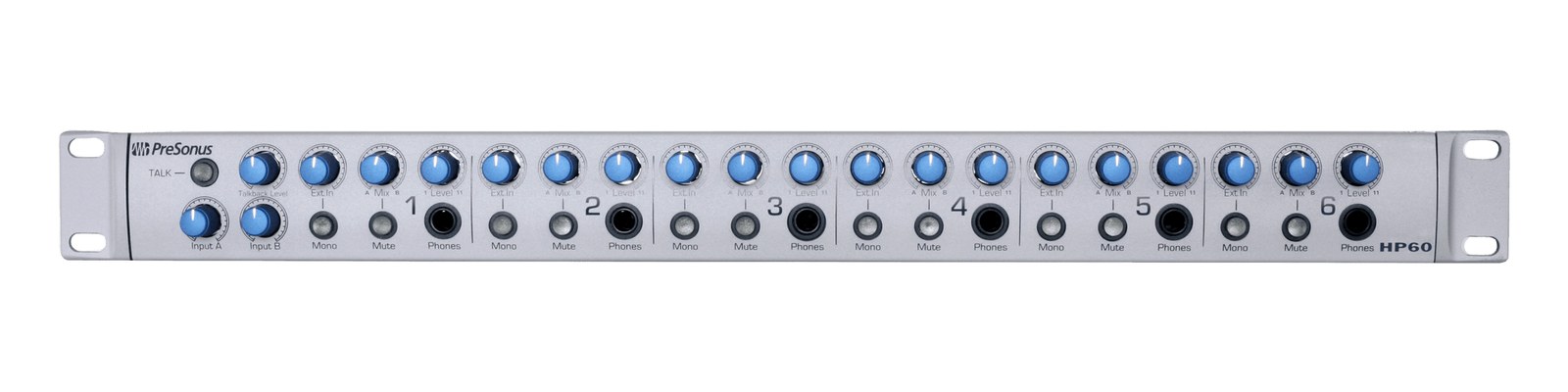
HP60The PreSonus HP60 is a 6-channel rack-mount headphone mixer with per-channel mix between a main stereo and a cue feed, giving each performer their own balance of the band mix and the click track or talkback. Common pickup for tracking studios and houses of worship that run cue mixes alongside the main FOH feed.View gear →
06 · Resolve the questions that can change the purchase or build plan.
Planning questions
Short, source-backed answers surface rack fit, power, cabling, and connection details before they become surprises.
How will the Hear Technologies HB-Mix Hub affect rack fit and case depth?
It occupies 1U. Its documented depth is 200 mm.
How much power does the Hear Technologies HB-Mix Hub draw?
Typical draw is 15W and documented maximum draw is 20W.
What connections does the Hear Technologies HB-Mix Hub have?
6 documented physical ports, including Input 1-8 (DB25), Cat5 Out 1, Cat5 Out 2, Cat5 Out 3, Cat5 Out 4, Power (IEC).
07 · See this unit inside a real rack plan.
Builder preview
Placement is only the start. Builder checks space · depth · weight, power headroom, dependencies, and compatible signal paths around this exact catalog item.Open in Builder