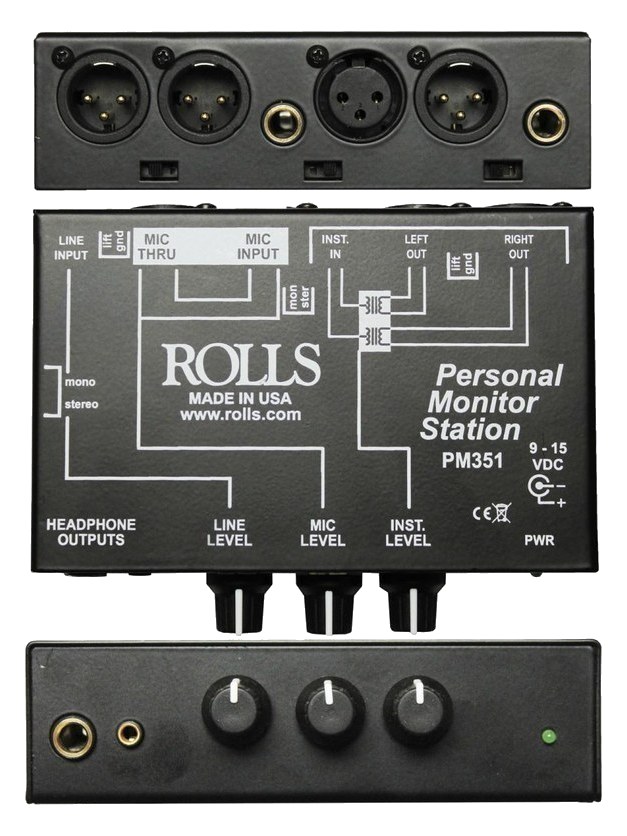
The Rolls PM351 is a simple belt-clip personal monitor mixer that lets a musician blend up to three audio sources into their headphone or IEM mix. It is commonly used to add an ambient mic feed or click track alongside a stereo monitor mix, giving performers a basic but effective way to customize what they hear. At this price point, it is the most affordable way to give a musician personal mix control.
UnverifiedPower requirement is not verified in the catalog
Catalog estimate
~$79Use retailer rows for current price and stock
01 · What it does—and what that changes in your rig.
Product overview
Start with the payoff, then work through how it functions, where it fits, and the details that change a real build.
The payoff
Headphone Amp decisions, organized around the whole rig.
The Rolls PM351 is a belt-clip personal monitor mixer aimed squarely at the performer who wants some control over what lands in their ears without burdening the monitor engineer with every adjustment. It accepts up to three sources — one via XLRThe standard 3-pin locking connector for mics and balanced line signals — pin 1 is the shield, pins 2 and 3 carry the balanced pair. and one via quarter-inch TRSTip-Ring-Sleeve — a 1/4″ jack with three contacts carrying a balanced signal or a stereo pair. A guitar plug with one extra ring. on the input side — blends them at a personal level, and sends the result to a headphone or IEMIn-Ear Monitor — earpieces that replace floor wedges, feeding each player their own mix. The reason this whole rack exists. output. The classic use case is a musician taking a stereo mix from the console, adding their own ambient mic or click trackThe metronome in the band’s ears keeping everyone locked to tempo — essential once backing tracks or timecode join the show. feed, and riding the blend themselves during the show.
Documented outputs
1One destination connection
Documented inputs
2Based on documented inputs
Rack space
Outside rackPlan a shelf, tray, or stage position
Rolls product panelOutside rack · Unverified
Function
How it works in the path
Because the PM351 draws no power from the mains and weighs next to nothing, it disappears into a rig without friction. There is no rack footprint to plan around — it clips to a belt, a mic stand, or a guitar strap. The XLRThe standard 3-pin locking connector for mics and balanced line signals — pin 1 is the shield, pins 2 and 3 carry the balanced pair. input means it can accept a direct feed from a monitor mix output or a dedicated auxAn auxiliary mix output — each aux is its own independent blend of the channels, typically one per monitor mix or effects send. without an adapter. The headphone output handles standard IEMsIn-Ear Monitor — earpieces that replace floor wedges, feeding each player their own mix. The reason this whole rack exists. and headphones. What it does not do is provide any gainHow much the preamp amplifies the incoming signal. Too low and you’re hunting through hiss; too high and peaks clip. structure sophistication, phantom powerThe +48 V a console sends up the mic cable to power condenser mics and active DI boxes — invisible to gear that doesn’t need it., or stereo busA path where multiple channels sum into one signal — mixes, groups, and mains are all buses. A 25-bus console can build 25 blends at once. management, so it works best when the signal arriving at it is already at a sensible line or monitor level.
Best fit
Where it earns its place in the system
This unit belongs in the hands of a musician who needs a quick, cheap way to add one or two supplemental feeds — a click, a guide vocal, an ambient room mic — on top of what the console is already sending them. Touring engineers who hand these off to performers as a self-serve solution will find them reliable for that limited job. If your performer needs a true personal mixing station with multiple auxAn auxiliary mix output — each aux is its own independent blend of the channels, typically one per monitor mix or effects send. returns, individual EQ, or stereo image control, look at a dedicated personal monitoring system like the Hear Technologies or Aviom families. The PM351 is a supplement, not a replacement, for a real IEMIn-Ear Monitor — earpieces that replace floor wedges, feeding each player their own mix. The reason this whole rack exists. infrastructure.
In the rack
Details worth deciding before load-in.
Feed the XLRThe standard 3-pin locking connector for mics and balanced line signals — pin 1 is the shield, pins 2 and 3 carry the balanced pair. input from a dedicated mono auxAn auxiliary mix output — each aux is its own independent blend of the channels, typically one per monitor mix or effects send. on the console — this keeps the click or ambient mic fully isolated and lets the engineer mute it at the desk if needed without touching the main mix.
If your performer is on IEMsIn-Ear Monitor — earpieces that replace floor wedges, feeding each player their own mix. The reason this whole rack exists., verify their earphone impedanceOpposition to signal flow, in ohms. Low-impedance IEMs are easier to drive loud; mismatches shift level and tone. is in a range the PM351 can drive adequately; high-impedance headphones may come out quieter than expected since there is no amplifier stage spec published.
Velcro a spare PM351 in the IEMIn-Ear Monitor — earpieces that replace floor wedges, feeding each player their own mix. The reason this whole rack exists. rack drawer as a backup — at this price and size it is worth carrying a second unit rather than losing a performer's mix confidence mid-show.
Use the TRSTip-Ring-Sleeve — a 1/4″ jack with three contacts carrying a balanced signal or a stereo pair. A guitar plug with one extra ring. quarter-inch input for a stereo-summed mix from a headphone amp output if you need to cascade it with another device upstream, keeping the XLRThe standard 3-pin locking connector for mics and balanced line signals — pin 1 is the shield, pins 2 and 3 carry the balanced pair. free for the direct console auxAn auxiliary mix output — each aux is its own independent blend of the channels, typically one per monitor mix or effects send..
02 · Know the whole path before you buy.
Signal path
Learn the route as a block diagram: source, product function, transport, and destination. Select any block to see what enters, what changes, and what leaves.
Interactive block diagramAuto-looping · hover, focus, or tap to hold a stage
Port-type signalProduct functionSystem boundary
Follow one signal from source to destination
Each block answers the same three questions: what arrives, what changes here, and what leaves.
01 · Source · selected
XLR female + ¼-inch TRS
¼-inch TRS
01 · Source
2 documented inputs
XLR female + ¼-inch TRS
Arrives as
2 documented inputs
Connector
XLR female + ¼-inch TRS
Signal
analog audio
03 · What this product asks of the rest of the system.
Compatibility
Treat connector names as the start of the check—not the answer. These are the boundaries that determine a complete working path.
Best fit · Headphone Amp
Use it as headphone amp tracked outside rack rails; follow the manufacturer’s mounting and form-factor guidance.
Plan the companion path
Complete the path with upstream and downstream gear that matches connector, direction, signal type, protocol, and wiring standard.
Connector boundary
Documented connectors: XLR female, ¼-inch TRS. Match connector, direction, and signal type—not shape alone.
04 · Every connector, grouped by job.
I/O ports
Switch the product view and the documented port inventory updates with it—hardware and data stay side by side.
Every connector, grouped by job.
Switch panels to keep the hardware view and the documented port list in sync.
Front panelRear panel
All documented ports for Rolls PM351 Personal Monitor
Port
Panel
Connector
Direction
Signal
Channels
XLR In
rear
XLR female
input
analog audio
—
TRS In
rear
¼-inch TRS
input
analog audio
—
Headphone Out
rear
¼-inch TRS
output
analog audio
—
Showing 3 of 3 documented physical ports.
05 · Compare the decision, not just the price.
Alternatives
The rows are organized around fit, power, I/O, and system role so a cheaper unit cannot hide a more expensive workflow.
PM351The Rolls PM351 is a simple belt-clip personal monitor mixer that lets a musician blend up to three audio sources into their headphone or IEM mix. It is commonly used to add an ambient mic feed or click track alongside a stereo monitor mix, giving performers a basic but effective way to customize what they hear. At this price point, it is the most affordable way to give a musician personal mix control.View gear →
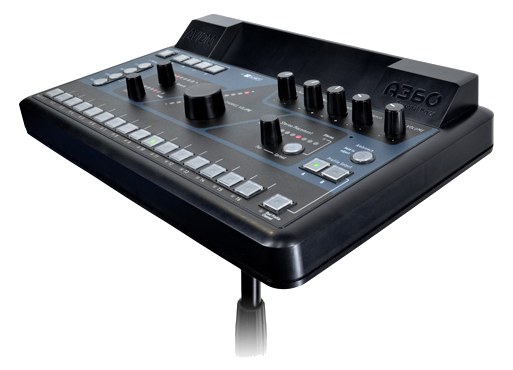
A360The Aviom A360 is a professional 36-channel personal mixer that gives musicians extensive control over their monitor mix with dedicated per-channel volume, pan, tone, and grouping. Its Pro16e networking carries all 36 channels over a single Cat5 cable, keeping stage wiring clean. This is a significant step up from basic personal mixers and is well-suited for demanding musicians who want studio-grade mix control on stage.View gear →
Hear Back Mix HubThe Hear Back Mix Hub is a rack-mount distribution hub that takes eight channels of analog audio via DB25 and distributes them to multiple personal mixer stations over Cat5 cabling. Each musician gets their own Hear Back mixer to create a custom blend, while the hub handles the conversion and distribution from a single 1U rack space. It is a cost-effective personal monitoring solution that scales well for bands of up to eight musicians.View gear →
HA8000The Behringer Powerplay HA8000 is an 8-channel rack-mount headphone amp at a budget price point. Each channel has its own input + level + headphone output, plus a stereo main bus that all channels can mix in. Common pickup for tracking sessions, broadcast facilities, and anywhere you need to feed many pairs of headphones from one console output.View gear →
06 · Resolve the questions that can change the purchase or build plan.
Planning questions
Short, source-backed answers surface rack fit, power, cabling, and connection details before they become surprises.
Where does the Rolls PM351 Personal Monitor live in a complete rig?
The catalog assigns it no rack units. Builder tracks it as non-rack gear; follow the manufacturer’s mounting, case, and form-factor guidance.
How much power does the Rolls PM351 Personal Monitor draw?
Its power requirement is not yet verified in the catalog.
What connections does the Rolls PM351 Personal Monitor have?
3 documented physical ports, including XLR In, TRS In, Headphone Out.
07 · See this gear inside a complete system plan.
Builder preview
Builder keeps non-rack gear in the same bill of materials, budget, dependency, and connection plan as the rack-mounted system around it.Open in Builder