Ableton Push 3
Ableton·Model Push 3·ableton-push3
Photos
Manufacturer product photography — the drawn faceplate above stays true to panel layout; these show the hardware itself.
About the Ableton Push 3
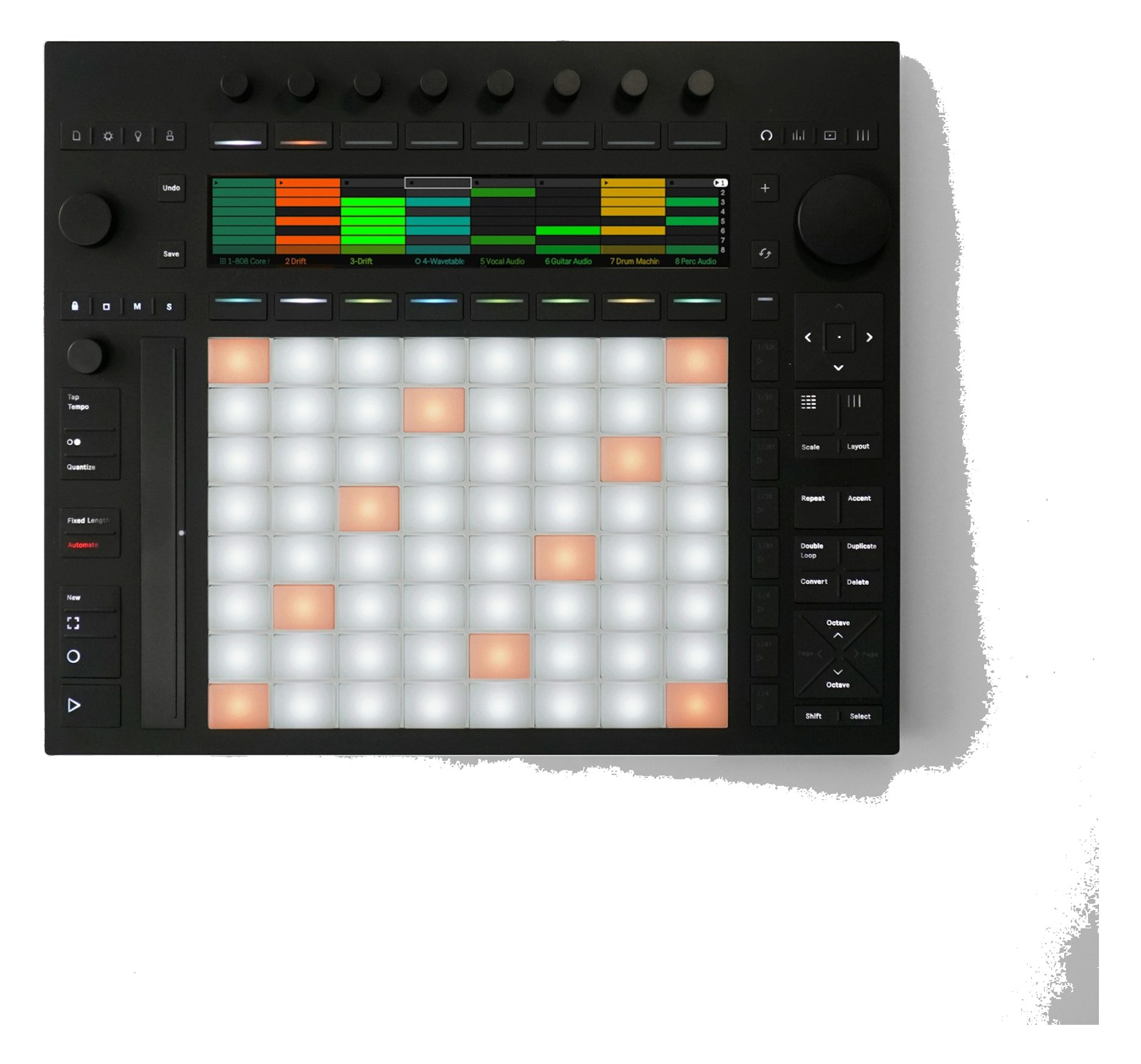
The Ableton Push 3 is the definitive hardware controller for Ableton Live, offering deep integration for launching clips, triggering scenes, and manipulating effects during a live performance. In standalone mode it can run Ableton Live Sets without a connected computer, providing a compelling backup option for playback-dependent shows. Its pads, encoders, and display make it natural to interact with your session without staring at a laptop screen.
Push 3 sits at the intersection of performance controller and standalone playback engine. In a live-audio rig it most often shows up as the hands-on interface for an Ableton Live session — launching clips, firing cues, tweaking sends — letting the operator work the show without hunting through a laptop screen. What separates it from a generic MIDI pad controller is that tight, purpose-built relationship with Live: every pad, encoder, and display element maps to the session in ways that a generic controller has to be programmed to approximate. For playback-heavy productions running backing tracks or stemsSub-mixes of a session grouped by instrument (drums, keys, vocals) — how playback rigs run tracks with live control over each group., that tight integration is the whole point.
The catalog record flags something worth noting: Push 3 is listed as not rack-mountable and carries zero rack-unit footprint, meaning it lives on a table, a road case lid, or a dedicated stand — not in a 19-inch rack. It draws up to 20 watts and connects via USB-C, running either tethered to a laptop or fully standalone with a set loaded internally. The two quarter-inch TRSTip-Ring-Sleeve — a 1/4″ jack with three contacts carrying a balanced signal or a stereo pair. A guitar plug with one extra ring. outputs let you route audio directly without an external interface in standalone mode, which matters when you're trying to keep the rig lean. At 3 kg it travels easily, but budget the table real estate — at 300 mm deep it isn't shallow.
Push 3 makes sense if Ableton Live is already the spine of your show and you want tactile, screen-free control over it, or if you need a credible standalone fallback that doesn't require a laptop to be open and awake. It is not the right call if your playback rig runs on a different DAWDigital Audio Workstation — the recording and playback software (Logic, Ableton Live, Pro Tools) at the center of a computer rig., if your budget demands a general-purpose MIDI controller that works across multiple platforms, or if every surface in your touring setup must rack-mount. In those cases a dedicated interface paired with a more universal controller will serve you better.
In the rack
- In standalone mode the two TRSTip-Ring-Sleeve — a 1/4″ jack with three contacts carrying a balanced signal or a stereo pair. A guitar plug with one extra ring. outputs are your only analog exits — patch them directly into two channels of your stage boxThe I/O endpoint on stage: mics plug in there and one digital line (AES50, Dante) carries everything to the console. The snake, digitized. or interface and treat it as a self-contained playback source for rehearsals or emergency fallback.
- Run a short USB-C cable to a powered hub or laptop even when using standalone mode so you have a live connection for set edits without powering the unit off mid-show.
- Velcro or bolt Push 3 to a dedicated riser on your desk or cable drum so it doesn't shift during load-in — its depth means it can hang over the edge of a shallow table and torque the USB-C port if it slides.
- If Push 3 is your primary playback controller, keep a mapped QWERTY keyboard shortcut cheat sheet taped nearby for the few session operations the hardware can't reach in standalone mode.
Standalone or controller mode. Not rack-mountable.
I/O Ports (3)
| Port | Connector | Direction | Signal | Channels |
|---|---|---|---|---|
| USB-C | USB C | bidirectional | data | — |
| Audio Out 1 (TRS) | TRS QUARTER | output | analog audio | — |
| Audio Out 2 (TRS) | TRS QUARTER | output | analog audio | — |
Related gear

Related articles
Guides from our library that cover planning around midi controller gear.
How to build a live-performance playback rig that runs click + backing tracks reliably — interface sizing, routing rules, software comparison, and what to do when the laptop crashes.
How to build a fail-safe live playback rig with primary + backup laptops, an auto-switching audio interface, and a failover workflow you can actually trust on a Sunday morning.