The Keith McMillen 12 Step is a chromatic MIDI foot controller designed for hands-free triggering of clips, scenes, or program changes during a live performance. Its slim profile fits on a pedalboard or stage floor without taking up much space, and the pressure-sensitive pads allow for expressive control. Commonly used by musicians who need to advance tracks or trigger cues with their feet while their hands are occupied with instruments.
UnverifiedPower requirement is not verified in the catalog
Catalog estimate
~$199Use retailer rows for current price and stock
01 · What it does—and what that changes in your rig.
Product overview
Start with the payoff, then work through how it functions, where it fits, and the details that change a real build.
The payoff
MIDI Controller decisions, organized around the whole rig.
The Keith McMillen 12 Step is a chromatic MIDI foot controller built for one specific job: keeping your hands on your instrument while your feet handle the cuing. In a playback or IEMIn-Ear Monitor — earpieces that replace floor wedges, feeding each player their own mix. The reason this whole rack exists. rig context, that means advancing tracks, firing scene changes, or sending program change messages to your playback host without reaching for a laptop or asking a tech to babysit the spacebar. It sits on the stage floor or pedalboard rather than in a rack bay — at 1 kg and a slim profile, it travels light and sets up fast.
Documented outputs
00 destination connections
Documented inputs
0Based on documented inputs
Rack space
Outside rackPlan a shelf, tray, or stage position
Keith McMillen product panelOutside rack · Unverified
Function
How it works in the path
Power draw is zero watts because the 12 Step runs entirely over USB busA path where multiple channels sum into one signal — mixes, groups, and mains are all buses. A 25-bus console can build 25 blends at once. power, which simplifies your power planning but means you need a live USB host — a laptop, a tablet with the right adapter, or a dedicated MIDI host box — within cable reach. There is no 5-pin DINThe round 5-pin connector classic MIDI uses — the original way synths, pedals, and playback rigs talk to each other. output onboard, so if your rig speaks hardware MIDI only, you will need a USB-MIDI interface in the chain. The pressure-sensitive pads do more than send on/off messages; they can transmit velocity and continuous pressure data, which opens up expressive parameter control if your software is set up to receive it. One USB port, bidirectional, is the entire I/O story — straightforward to troubleshoot.
Best fit
Where it earns its place in the system
This pedal makes most sense for a solo performer or small-band situation where one player needs hands-free transport or cue control and the rig is already laptop-based. If you are running Ableton Live, MainStage, or a similar host, the 12 Step integrates without drama. It is not the right call if your playback system is hardware-only MIDI, if you need more than twelve discrete triggers per bank without banking, or if you want robust roadcase-ready construction for a high-traffic touring rig where a more armored controller might hold up better. At this price point, it earns its place in smaller, smarter setups.
In the rack
Details worth deciding before load-in.
Route USB through a reliable powered hub or directly into your playback laptop — avoid cheap passive hubs that drop busA path where multiple channels sum into one signal — mixes, groups, and mains are all buses. A 25-bus console can build 25 blends at once. power intermittently mid-show.
If your playback host is more than a few meters away, use an active USB extension or a USB-MIDI host adapter at the pedal end to avoid signal degradation over long cable runs.
Map each pad's program change number during soundcheck, not at load-in — confirm the pedal is talking to the correct MIDI channel in your host before the room fills up.
Tape the 12 Step to your pedalboard or mark its position on the stage plot so it lands in the same spot every night; muscle memory for foot cuing only works if the pedal is always exactly where you expect it.
02 · Know the whole path before you buy.
Signal path
Learn the route as a block diagram: source, product function, transport, and destination. Select any block to see what enters, what changes, and what leaves.
Interactive block diagramAuto-looping · hover, focus, or tap to hold a stage
Port-type signalProduct functionSystem boundary
Follow one signal from source to destination
Each block answers the same three questions: what arrives, what changes here, and what leaves.
01 · Connection · selected
usb b
01 · Connection
1 bidirectional connection
usb b
Connection
1 bidirectional port
Connector
usb b
Signal
data
03 · What this product asks of the rest of the system.
Compatibility
Treat connector names as the start of the check—not the answer. These are the boundaries that determine a complete working path.
Best fit · MIDI Controller
Use it as midi controller tracked outside rack rails; follow the manufacturer’s mounting and form-factor guidance.
Plan the companion path
Complete the path with upstream and downstream gear that matches connector, direction, signal type, protocol, and wiring standard.
Connector boundary
Documented connectors: usb b. Match connector, direction, and signal type—not shape alone.
04 · Every connector, grouped by job.
I/O ports
Switch the product view and the documented port inventory updates with it—hardware and data stay side by side.
Every connector, grouped by job.
Switch panels to keep the hardware view and the documented port list in sync.
Front panelRear panel
All documented ports for Keith McMillen 12 Step MIDI Pedal
Port
Panel
Connector
Direction
Signal
Channels
USB
rear
usb b
bidirectional
data
—
Showing 1 of 1 documented physical ports.
05 · Compare the decision, not just the price.
Alternatives
The rows are organized around fit, power, I/O, and system role so a cheaper unit cannot hide a more expensive workflow.
12 StepThe Keith McMillen 12 Step is a chromatic MIDI foot controller designed for hands-free triggering of clips, scenes, or program changes during a live performance. Its slim profile fits on a pedalboard or stage floor without taking up much space, and the pressure-sensitive pads allow for expressive control. Commonly used by musicians who need to advance tracks or trigger cues with their feet while their hands are occupied with instruments.View gear →
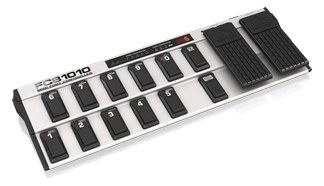
FCB1010The Behringer FCB1010 is a full-featured MIDI foot controller at a budget price, offering ten footswitches and two expression pedals in a pedalboard-style format. It sends MIDI program changes, control changes, and note messages, making it versatile for controlling playback software, effects processors, or lighting cues from the stage floor. The two expression pedals add real-time parameter control that simpler foot controllers lack.View gear →
MC8The Morningstar MC8 is a highly programmable MIDI foot controller favored by guitarists and keyboardists who need precise, customizable control over their rig. Its deep editing software lets you assign complex MIDI messages, multi-action sequences, and conditional logic to each button, making it powerful for advanced show control workflows. USB-C and TRS MIDI outputs provide flexible connectivity to both modern and legacy MIDI devices.View gear →
06 · Resolve the questions that can change the purchase or build plan.
Planning questions
Short, source-backed answers surface rack fit, power, cabling, and connection details before they become surprises.
Where does the Keith McMillen 12 Step MIDI Pedal live in a complete rig?
The catalog assigns it no rack units. Builder tracks it as non-rack gear; follow the manufacturer’s mounting, case, and form-factor guidance.
How much power does the Keith McMillen 12 Step MIDI Pedal draw?
Its power requirement is not yet verified in the catalog.
What connections does the Keith McMillen 12 Step MIDI Pedal have?
1 documented physical ports, including USB.
07 · See this gear inside a complete system plan.
Builder preview
Builder keeps non-rack gear in the same bill of materials, budget, dependency, and connection plan as the rack-mounted system around it.Open in Builder