MIDI Controller

Behringer FCB1010 MIDI Foot Controller

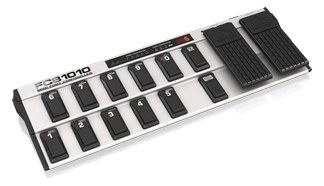
The Behringer FCB1010 is a full-featured MIDI foot controller at a budget price, offering ten footswitches and two expression pedals in a pedalboard-style format. It sends MIDI program changes, control changes, and note messages, making it versatile for controlling playback software, effects processors, or lighting cues from the stage floor. The two expression pedals add real-time parameter control that simpler foot controllers lack.

Compare

Photos

Manufacturer product photography showing the hardware, controls, and physical form.

Photo: BehringerClick to zoom
Documented outputs
1One destination connection
Documented inputs
0Based on documented inputs
Rack space
Outside rackPlan a shelf, tray, or stage position
Power draw
5W8W documented maximum
Catalog estimate
~$149Use retailer rows for current price and stock

01 · What it does—and what that changes in your rig.

Product overview

Start with the payoff, then work through how it functions, where it fits, and the details that change a real build.

The payoff

MIDI Controller decisions, organized around the whole rig.

The FCB1010 is a floor-based MIDI foot controller — ten numbered footswitches, two expression pedals, and enough programmability to trigger program changes, control changes, and note messages across multiple MIDI channels. In a live rig context it sits on the stage floor and lets a performer or tech send commands up to the rack without touching anything by hand: switching patches on a guitar processor, cueing playback banks, toggling effects states, or even firing lighting scenes if your show controller is listening on MIDI. For the price, nothing else in this category gives you two expression pedals out of the box.

Documented outputs
1One destination connection
Documented inputs
0Based on documented inputs
Rack space
Outside rackPlan a shelf, tray, or stage position
Behringerexternal · not rackmounted
Behringer product panelOutside rack · 5W
Function

How it works in the path

At load-in the FCB1010 connects to your rack via a single TRS-to-MIDI-DIN cable from its quarter-inch MIDI out — make sure your receiving device has a TRS MIDI in or you have the right adapter in your kit, because it is not a standard five-pin DIN on the controller end. Programming banks can take time on the hardware itself; the unit is well-known for a somewhat tedious native editor, and most engineers invest an evening with a third-party editor app before the first show. Power draw is minimal at five watts, and at 3.7 kg it is sturdy enough for consistent nightly use without feeling delicate underfoot.
Best fit

Where it earns its place in the system

The FCB1010 earns its place in budget and mid-tier rigs where you need floor control over a rack device and do not want to spend on a proprietary controller. It is a sensible choice for a backline tech running patches for a guitarist's effects rack, or a keys player who needs to switch playback banks hands-free. If you need deep integration with a specific platform — Ableton, for example — confirm your MIDI routing can accommodate the FCB1010's output before committing. Players who need wireless floor control or a more streamlined programming experience should look at dedicated controllers from Line 6 or RJM, which carry significantly higher price tags but reflect that investment in usability.

In the rack

Details worth deciding before load-in.

  • Keep a pre-programmed backup FCB1010 in the trailer if this is your only floor controller — at $149 it is the cheapest insurance you will buy, and swapping one requires only a cable change.
  • Label each footswitch with a P-touch or Dymo strip before doors open; the numbered layout is logical in rehearsal and invisible under stage lighting.
  • Route its MIDI out through a MIDI thru box if you need to control more than one rack device simultaneously — the FCB1010 has a single output and does not split on its own.
  • Program all show-critical patches in bank order and run a floor-to-rack MIDI monitor test at soundcheck to confirm no switched channels or missing CCs before the room fills.

02 · Know the whole path before you buy.

Signal path

Learn the route as a block diagram: source, product function, transport, and destination. Select any block to see what enters, what changes, and what leaves.

Interactive block diagramAuto-looping · hover, focus, or tap to hold a stage
Port-type signalProduct functionSystem boundary
Follow one signal from source to destination

Each block answers the same three questions: what arrives, what changes here, and what leaves.

01 · This unit · selected
01 · This unit

Behringer FCB1010 MIDI Foot Controller

Budget 5W typical and 8W maximum.

Arrives through
No documented input
This stage
Performs the documented product role
Power
5W

03 · What this product asks of the rest of the system.

Compatibility

Treat connector names as the start of the check—not the answer. These are the boundaries that determine a complete working path.

Best fit · MIDI Controller

Use it as midi controller tracked outside rack rails; follow the manufacturer’s mounting and form-factor guidance.

Plan the companion path

Complete the path with upstream and downstream gear that matches connector, direction, signal type, protocol, and wiring standard.

Connector boundary

Documented connectors: ¼-inch TRS. Match connector, direction, and signal type—not shape alone.

04 · Every connector, grouped by job.

I/O ports

Switch the product view and the documented port inventory updates with it—hardware and data stay side by side.

Every connector, grouped by job.

Switch panels to keep the hardware view and the documented port list in sync.

Front panel
front connector map for Behringer FCB1010 MIDI Foot ControllerEXTERNAL UNIT · FRONTNo documented front ports
Rear panel
rear connector map for Behringer FCB1010 MIDI Foot ControllerEXTERNAL UNIT · REAR¼-inch TRSoutput
All documented ports for Behringer FCB1010 MIDI Foot Controller
PortPanelConnectorDirectionSignalChannels
MIDI Outrear¼-inch TRS outputdata—

Showing 1 of 1 documented physical ports.

05 · Compare the decision, not just the price.

Alternatives

The rows are organized around fit, power, I/O, and system role so a cheaper unit cannot hide a more expensive workflow.

Compare
Behringer FCB1010 MIDI Foot Controller
iConnectivity mioXM MIDI Interface
External unit
Fit📐 Outside rack📐 1U📐 1U · half-rack📐 Outside rack
Power⚡ 5W⚡ 3W⚡ 2W⚡ Unverified
Weight⚖️ 8.2 lb⚖️ 1.1 lb⚖️ 0.7 lb⚖️ 2.2 lb
I/O🔌 1🔌 25🔌 12🔌 1
Estimate💵 ~$149💵 ~$299💵 ~$179💵 ~$199
Deep diveCurrent selectionFull comparison →Full comparison →Full comparison →

06 · Resolve the questions that can change the purchase or build plan.

Planning questions

Short, source-backed answers surface rack fit, power, cabling, and connection details before they become surprises.

Where does the Behringer FCB1010 MIDI Foot Controller live in a complete rig?

The catalog assigns it no rack units. Builder tracks it as non-rack gear; follow the manufacturer’s mounting, case, and form-factor guidance.

How much power does the Behringer FCB1010 MIDI Foot Controller draw?

Typical draw is 5W and documented maximum draw is 8W.

What connections does the Behringer FCB1010 MIDI Foot Controller have?

1 documented physical ports, including MIDI Out.

07 · See this gear inside a complete system plan.

Builder preview

Builder keeps non-rack gear in the same bill of materials, budget, dependency, and connection plan as the rack-mounted system around it.Open in Builder
FCB1010 MIDI Foot Controller tracked in a complete system planA simplified plan shows the gear tracked outside rack rails, with its documented connection path continuing to a planned destination.Tracked outside rack railsBehringerFCB1010CONNECTED GEARnext signal destinationExternal system gear · no rack units assigned

08 · Related gear, in the order you may need it.

Planning guides for midi controller systems.