The iConnectivity mioXM is a compact half-rack 4x4 MIDI interface that combines classic 5-pin DIN MIDI with USB and Ethernet connectivity. It supports USB multi-hosting so you can bridge MIDI between two computers, and the Ethernet port enables networkable MIDI over standard network infrastructure — perfect for distributed rigs where your MIDI controller is far from your playback machine. Standalone routing works without a computer, making it reliable for live use.
~$179Use retailer rows for current price and stock
01 · What it does—and what that changes in your rig.
Product overview
Start with the payoff, then work through how it functions, where it fits, and the details that change a real build.
The payoff
MIDI Controller decisions, organized around the whole rig.
The mioXM is a half-rackThe standard slice of rack height: 1U = 1.75″. A 3U box takes three slices; half-rack gear pairs two units side by side in one. MIDI interface that sits at the junction of old-school DINThe round 5-pin connector classic MIDI uses — the original way synths, pedals, and playback rigs talk to each other. routing and modern networked rigs. Its job is bridging MIDI between devices that would otherwise have no clean way to talk — a hardware synth on one end, a playback machine on another, maybe a computer running your show file somewhere across the stage. Two TRSTip-Ring-Sleeve — a 1/4″ jack with three contacts carrying a balanced signal or a stereo pair. A guitar plug with one extra ring.-eighth inputs and two outputs cover the physical DIN world, while USB host and device ports plus a network jack let it reach into less conventional territory. In a compact IEMIn-Ear Monitor — earpieces that replace floor wedges, feeding each player their own mix. The reason this whole rack exists. or playback rack where MIDI has to flow reliably and without drama, this is the kind of utility piece that earns its half-rack slot.
Documented outputs
44 destination connections
Documented inputs
5Based on documented inputs
Rack space
1U · half-rackBuilder checks available rail space
Photo: iConnectivity1U · half-rack · 2W
Function
How it works in the path
At load-in, the details that matter are the ones you don't have to think about. The mioXM draws under three watts, weighs next to nothing, and at 108mm deep it won't challenge even a shallow rack. The Ethernet port is the feature worth pausing on — rtpMIDI over a standard network switch means your controller at FOHFront Of House — the main mix the audience hears, and the console position out in the room where it gets mixed. or on a keyboard riser can reach your rack without running a dedicated MIDI snakeA multicore cable bundling many channels into one stage-to-console run. A sub-snake collects one corner of the stage into a drop box. across the stage. The USB host port lets you connect a class-compliant USB MIDI controller directly, no laptop required. Standalone routing means if your MacBook crashes mid-show, the mioXM keeps routing what it already knows about.
Best fit
Where it earns its place in the rack
If your rig has a playback machine, a hardware controller, and any meaningful physical distance between them, the mioXM solves a real problem elegantly. It's also a clean solution for bridging two computers — say, a primary and backup — without a DINThe round 5-pin connector classic MIDI uses — the original way synths, pedals, and playback rigs talk to each other. daisy-chain. Where it's not the right call: if you need more than four ports in each direction, or if you're deep in a DAWDigital Audio Workstation — the recording and playback software (Logic, Ableton Live, Pro Tools) at the center of a computer rig.-centric studio workflow where a more feature-rich USB interface makes more sense. For the live rig specifically, the network capability and standalone routing tip the balance firmly toward this box.
In the rack
Details worth deciding before load-in.
Use the Ethernet port with a small unmanaged switch to connect a stage-box keyboard controller to your rack MIDI without running a separate MIDI cable run — one CAT6Standard network cable grades. In an audio rig one cheap Cat5e run can replace a 48-channel copper snake; AES50 wants it shielded. in your audio snakeA multicore cable bundling many channels into one stage-to-console run. A sub-snake collects one corner of the stage into a drop box. does the work.
Set up and save your internal routing before the gig. If your playback computer drops offline, the mioXM holds its last routing state and keeps DINThe round 5-pin connector classic MIDI uses — the original way synths, pedals, and playback rigs talk to each other. devices talking to each other without intervention.
The TRSTip-Ring-Sleeve — a 1/4″ jack with three contacts carrying a balanced signal or a stereo pair. A guitar plug with one extra ring.-eighth MIDI ports are wired to the DINThe round 5-pin connector classic MIDI uses — the original way synths, pedals, and playback rigs talk to each other. standard, but double-check your adapter type — Type A and Type B TRS-to-DIN adapters are wired differently, and using the wrong one means silent MIDI.
Pair it with a half-rackThe standard slice of rack height: 1U = 1.75″. A 3U box takes three slices; half-rack gear pairs two units side by side in one. blank or a second half-rack unit on the same rail to keep your rack face tidy — at 0.3kg it's light enough that cable tension on the ports can shift it if it's not properly supported.
02 · Know the whole path before you buy.
Signal path
Learn the route as a block diagram: source, product function, transport, and destination. Select any block to see what enters, what changes, and what leaves.
Interactive block diagramAuto-looping · hover, focus, or tap to hold a stage
Port-type signalProduct functionSystem boundary
Follow one signal from source to destination
Each block answers the same three questions: what arrives, what changes here, and what leaves.
01 · Source · selected
midi din5 + dc barrel
RJ45
midi din5
01 · Source
5 documented inputs
midi din5 + dc barrel
Arrives as
5 documented inputs
Connector
midi din5 + dc barrel
Signal
data
03 · What this product asks of the rest of the system.
Compatibility
Treat connector names as the start of the check—not the answer. These are the boundaries that determine a complete working path.
Best fit · MIDI Controller
Use it when 1U · half-rack and 108 mm of depth fit the case.
Plan the companion path
Complete the path with upstream and downstream gear that matches connector, direction, signal type, protocol, and wiring standard.
Connector boundary
Documented connectors: midi din5, usb a, usb b, RJ45. Match connector, direction, and signal type—not shape alone.
04 · Every connector, grouped by job.
I/O ports
Switch the product view and the documented port inventory updates with it—hardware and data stay side by side.
Every connector, grouped by job.
Switch panels to keep the hardware view and the documented port list in sync.
Front panelRear panel
All documented ports for iConnectivity mioXM MIDI Interface
Port
Panel
Connector
Direction
Signal
Channels
MIDI In 1 (DIN, front)
front
midi din5
input
data
—
MIDI In 2 (DIN)
rear
midi din5
input
data
—
MIDI In 3 (DIN)
rear
midi din5
input
data
—
MIDI In 4 (DIN)
rear
midi din5
input
data
—
MIDI Out 1 (DIN, front)
front
midi din5
output
data
—
MIDI Out 2 (DIN)
rear
midi din5
output
data
—
MIDI Out 3 (DIN)
rear
midi din5
output
data
—
MIDI Out 4 (DIN)
rear
midi din5
output
data
—
USB Host
rear
usb a
bidirectional
data
—
USB-DAW (front, USB-B)
front
usb b
bidirectional
data
—
RTP-MIDI (front, RJ45)
front
RJ45
bidirectional
data
—
DC In (12V)
rear
dc barrel
input
power
—
Showing 12 of 12 documented physical ports. Scroll to review the remaining rows.
05 · Compare the decision, not just the price.
Alternatives
The rows are organized around fit, power, I/O, and system role so a cheaper unit cannot hide a more expensive workflow.
mioXMThe iConnectivity mioXM is a compact half-rack 4x4 MIDI interface that combines classic 5-pin DIN MIDI with USB and Ethernet connectivity. It supports USB multi-hosting so you can bridge MIDI between two computers, and the Ethernet port enables networkable MIDI over standard network infrastructure — perfect for distributed rigs where your MIDI controller is far from your playback machine. Standalone routing works without a computer, making it reliable for live use.View gear →
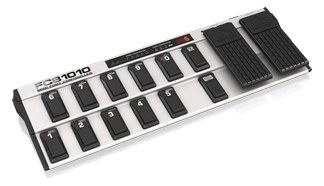
FCB1010The Behringer FCB1010 is a full-featured MIDI foot controller at a budget price, offering ten footswitches and two expression pedals in a pedalboard-style format. It sends MIDI program changes, control changes, and note messages, making it versatile for controlling playback software, effects processors, or lighting cues from the stage floor. The two expression pedals add real-time parameter control that simpler foot controllers lack.View gear →
mio 10The iConnectivity mio 10 is a full-width 19-inch 1U MIDI interface providing ten 5-pin DIN input/output pairs with programmable routing and filtering. The USB multi-host capability lets it bridge MIDI between two computers, and the standalone routing operates without a computer connected.View gear →
mio XLThe iConnectivity mio XL is a professional MIDI router and interface with 16 MIDI ports (10 DIN + 6 USB), Ethernet MIDI for long cable runs, and an advanced routing matrix that maps any input to any output. In complex playback rigs with multiple MIDI-controlled devices (lights, click, patch changes, IEM mixing), a dedicated MIDI router prevents conflicts and makes troubleshooting straightforward. The Ethernet MIDI capability eliminates the 50-foot limitation of standard MIDI cables.View gear →
06 · Resolve the questions that can change the purchase or build plan.
Planning questions
Short, source-backed answers surface rack fit, power, cabling, and connection details before they become surprises.
How will the iConnectivity mioXM MIDI Interface affect rack fit and case depth?
It occupies 1U · half-rack. Its documented depth is 108 mm.
How much power does the iConnectivity mioXM MIDI Interface draw?
Typical draw is 2W and documented maximum draw is 3W.
What connections does the iConnectivity mioXM MIDI Interface have?
12 documented physical ports, including MIDI In 1 (DIN, front), MIDI In 2 (DIN), MIDI In 3 (DIN), MIDI In 4 (DIN), MIDI Out 1 (DIN, front), MIDI Out 2 (DIN).
07 · See this unit inside a real rack plan.
Builder preview
Placement is only the start. Builder checks space · depth · weight, power headroom, dependencies, and compatible signal paths around this exact catalog item.Open in Builder