Network Switch

Luminex GigaCore 12 AV Network Switch

The Luminex GigaCore 12 is designed from the ground up for professional AV networking, with firmware pre-configured for Dante and AES67 traffic. Unlike generic IT switches, it requires minimal configuration out of the box to achieve optimal audio network performance. Its full-width 1U metal chassis is purpose-built for touring racks where reliability and ease of deployment matter more than port count.

Compare
Discontinued. Multiple dealer sites (A.C. Lighting, AC Americas) and Manualzz user manual confirm discontinuation January 2024 with GigaCore 16t replacement.
LUMINEXAV Network SwitchPower12345678910GigaCore 12
Documented outputs
00 destination connections
Documented inputs
1Based on documented inputs
Rack space
1UBuilder checks available rail space
Power draw
25W30W documented maximum
Catalog estimate
~$2,199Use retailer rows for current price and stock

01 · What it does—and what that changes in your rig.

Product overview

Start with the payoff, then work through how it functions, where it fits, and the details that change a real build.

The payoff

Network Switch decisions, organized around the whole rig.

The GigaCore 12 is Luminex's answer to a problem every touring engineer eventually runs into: generic IT switches that technically pass Dante traffic until they don't. Purpose-built for professional AV networking, it ships with firmware already configured for Dante and AES67 — meaning the multicast handling, IGMP snooping, and QoS prioritization that audio-over-IP traffic demands are set correctly before you plug in your first XLR-to-RJ45 cable. Eight copper RJ45 ports plus four SFP slots in a half-rack, 1U chassis gives you solid connectivity without eating your entire rack panel.

Documented outputs
00 destination connections
Documented inputs
1Based on documented inputs
Rack space
1UBuilder checks available rail space
LUMINEXAV Network SwitchPower12345678910GigaCore 12
Luminex product panel1U · 25W
Function

How it works in the path

At load-in, the practical difference between this and a pulled-from-storage Cisco unmanaged switch is time and confidence. You're not hunting through a web GUI at 7 AM wondering whether IGMP querier is enabled. The 160 mm depth means it fits comfortably in shallow touring racks without its IEC tail hanging into your cable bay. At 25 watts nominal draw, it's almost invisible on your power budget. The four SFP slots are the real long-game feature — fiber runs to a split stage or a separate FOH network node without signal degradation over distance.
Best fit

Where it earns its place in the rack

If your rig runs any meaningful amount of Dante — IEM personal mixes, a Waves server, digital splits to monitors and FOH simultaneously — this switch earns its place and its price. A two-console festival rig, a playback system feeding multiple Dante-enabled amps, a broadcast hybrid setup running AES67: all legitimate homes for the GigaCore 12. If you're running a single Dante device point-to-point and nothing else, a well-configured managed switch at a fraction of the cost will serve you fine. The GigaCore 12 justifies itself the moment network complexity does.

In the rack

Details worth deciding before load-in.

  • Use the SFP ports for your longest or most critical runs — fiber between the stage rack and FOH eliminates ground loop risk and keeps latency consistent regardless of cable run length.
  • Even though it's pre-configured for Dante, take ten minutes before the first show to document your VLAN layout and port assignments in your rig's paperwork. When something breaks at midnight, you want a map, not a memory.
  • Half-rack means you have a neighbor — pair it with a half-rack power distribution or a Dante interface module on a shared 1U tray to keep your rack unit count honest.
  • Keep it toward the middle or bottom of your rack away from high-heat amplifier sections; 25 watts is modest but network gear prefers stable thermals for consistent performance over a long show day.

02 · Know the whole path before you buy.

Signal path

Learn the route as a block diagram: source, product function, transport, and destination. Select any block to see what enters, what changes, and what leaves.

Interactive block diagramAuto-looping · hover, focus, or tap to hold a stage
Port-type signalProduct functionSystem boundary
Follow one signal from source to destination

Each block answers the same three questions: what arrives, what changes here, and what leaves.

01 · Source · selected
01 · Source

1 documented input

IEC C14

Arrives as
1 documented input
Connector
IEC C14
Signal
power

03 · What this product asks of the rest of the system.

Compatibility

Treat connector names as the start of the check—not the answer. These are the boundaries that determine a complete working path.

Best fit · Network Switch

Use it when 1U and 204.3 mm of depth fit the case.

Plan the companion path

Complete the path with upstream and downstream gear that matches connector, direction, signal type, protocol, and wiring standard.

Connector boundary

Documented connectors: RJ45, IEC C14. Match connector, direction, and signal type—not shape alone.

04 · Every connector, grouped by job.

I/O ports

Switch the product view and the documented port inventory updates with it—hardware and data stay side by side.

Every connector, grouped by job.

Switch panels to keep the hardware view and the documented port list in sync.

Front panel
LUMINEXAV Network SwitchPower12345678910GigaCore 12
Rear panel
LuminexGigaCore 12
All documented ports for Luminex GigaCore 12 AV Network Switch
PortPanelConnectorDirectionSignalChannels
Ethernet 1-8 (RJ45)rearRJ45 bidirectionaldata8
SFP 1-4rearRJ45 bidirectionaldata4
Power (IEC)rearIEC C14 inputpower—

Showing 3 of 3 documented physical ports.

05 · Compare the decision, not just the price.

Alternatives

The rows are organized around fit, power, I/O, and system role so a cheaper unit cannot hide a more expensive workflow.

Compare
CISCO
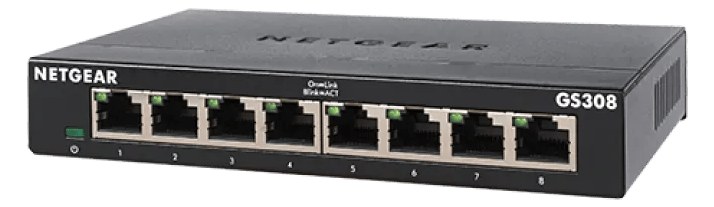
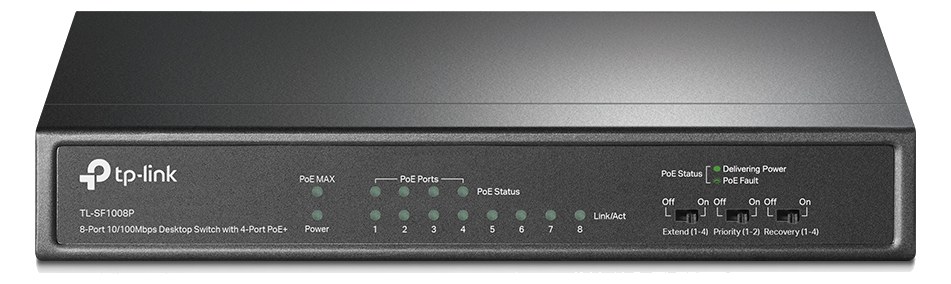
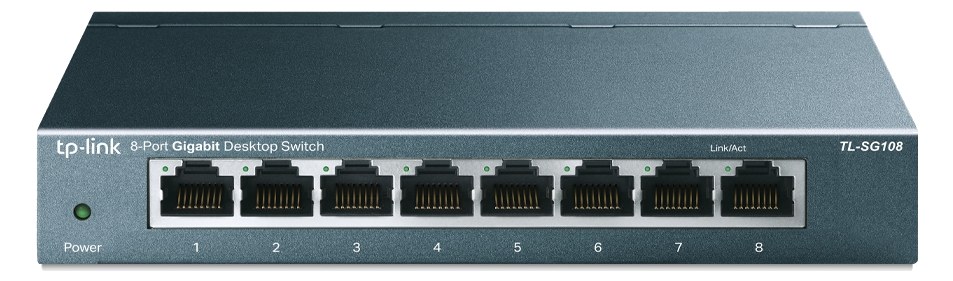
TP-Link TL-SG108 8-Port Switch
Netgear GS308 8-Port Switch
Fit📐 1U📐 1U📐 1U · half-rack📐 Outside rack
Power⚡ 25W⚡ 20W⚡ 4W⚡ 4W
Weight⚖️ 5.5 lb⚖️ 4.9 lb⚖️ 0.7 lb⚖️ 0.7 lb
I/O🔌 3🔌 3🔌 9🔌 8
Estimate💵 ~$2,199💵 ~$599💵 ~$24💵 ~$22
Deep diveCurrent selectionFull comparison →Full comparison →Full comparison →

06 · Resolve the questions that can change the purchase or build plan.

Planning questions

Short, source-backed answers surface rack fit, power, cabling, and connection details before they become surprises.

How will the Luminex GigaCore 12 AV Network Switch affect rack fit and case depth?

It occupies 1U. Its documented depth is 204.3 mm.

How much power does the Luminex GigaCore 12 AV Network Switch draw?

Typical draw is 25W and documented maximum draw is 30W.

What connections does the Luminex GigaCore 12 AV Network Switch have?

3 documented physical ports, including Ethernet 1-8 (RJ45), SFP 1-4, Power (IEC).

Is the Luminex GigaCore 12 AV Network Switch discontinued?

Multiple dealer sites (A.C. Lighting, AC Americas) and Manualzz user manual confirm discontinuation January 2024 with GigaCore 16t replacement.

07 · See this unit inside a real rack plan.

Builder preview

Placement is only the start. Builder checks space · depth · weight, power headroom, dependencies, and compatible signal paths around this exact catalog item.Open in Builder
GigaCore 12 AV Network Switch positioned in a rack planA simplified plan shows the unit taking 1 rack units, with its documented connection path continuing to a planned destination.LuminexGigaCore 12CONNECTED GEARnext signal destination1U · 204.3 mm deep

08 · Related gear, in the order you may need it.

Planning guides for network switch systems.