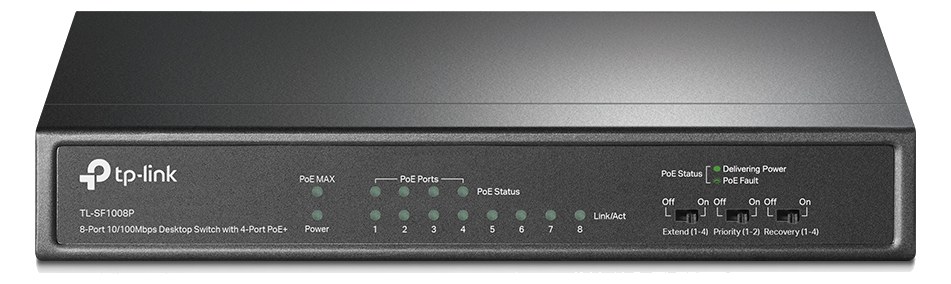
The TP-Link SF1008P provides Power over Ethernet on four of its eight ports, which is useful for powering Dante endpoints like the Audinate AVIO adapter or PoE-powered access points without separate power supplies. The 57W PoE budget handles several low-power devices comfortably. Note that this is a 10/100 switch rather than gigabit, so it is best suited for control networks or very small Dante deployments rather than high-channel-count audio networks.
01 · What it does—and what that changes in your rig.
Product overview
Start with the payoff, then work through how it functions, where it fits, and the details that change a real build.
The payoff
Network Switch decisions, organized around the whole rig.
The TL-SF1008P is a compact, unmanaged 10/100 switch with PoEPower over Ethernet — the network cable powers the device (stage boxes, personal mixers, access points). One less wall-wart to lose. on four of its eight ports and a 57W shared budget across those four. In a live-audio rack its job is narrow but useful: powering and connecting low-draw network devices — a DanteThe most common audio-over-network standard: dozens of channels of uncompressed digital audio down one ordinary Ethernet cable between Dante boxes. AVIO adapter, a wireless access point for remote control, or a tablet-facing router — without requiring a separate wall-wart for each one. At $49 and half a rack unitThe standard slice of rack height: 1U = 1.75″. A 3U box takes three slices; half-rack gear pairs two units side by side in one. on a shelf, it earns its place by eliminating small power-supply clutter that would otherwise multiply across the back of the rack.
Documented outputs
00 destination connections
Documented inputs
1Based on documented inputs
Rack space
1U · half-rackBuilder checks available rail space
TP-Link product panel1U · half-rack · 10W
Function
How it works in the path
The 10/100 speed ceiling is the number that shapes every deployment decision. Fast Ethernet tops out around 94 Mbps of real throughput, which is sufficient for a handful of low-channel DanteThe most common audio-over-network standard: dozens of channels of uncompressed digital audio down one ordinary Ethernet cable between Dante boxes. streams or a control-only network, but it will become a bottleneck quickly if you push high channel counts or try to run a dense Dante subnet through it. The 57W PoEPower over Ethernet — the network cable powers the device (stage boxes, personal mixers, access points). One less wall-wart to lose. budget is shared across all four PoE ports, so powering multiple devices simultaneously requires attention — a typical PoE access point draws 10–15W, an AVIO adapter around 3W, leaving margin, but it adds up. The 10W idle draw climbing to 66W fully loaded is worth noting when budgeting your rack's power conditionerFilters venue AC, clamps surges, and gives the rack one tidy inlet. Not a voltage regulator and not a battery — just cleaner power..
Best fit
Where it earns its place in the rack
This switch belongs in a rig where the network role is simple: a dedicated control VLANVirtual LAN — slicing one physical switch into separate isolated networks, like keeping Dante away from lighting and guest WiFi., a single wireless access point, or a small DanteThe most common audio-over-network standard: dozens of channels of uncompressed digital audio down one ordinary Ethernet cable between Dante boxes. island with two or three endpoints. If you're running Dante at any real scale — more than a handful of channels, multiple devices, or anything that shares a network with Waves SoundGrid or similar — step up to a gigabit managed switchA network switch you can configure — VLANs, QoS, IGMP — so audio traffic gets priority. Dante rigs beyond a few boxes want one.. Likewise, if you need more than four PoEPower over Ethernet — the network cable powers the device (stage boxes, personal mixers, access points). One less wall-wart to lose. ports or a total PoE budget beyond 57W, you'll outgrow this immediately. But for a compact IEMIn-Ear Monitor — earpieces that replace floor wedges, feeding each player their own mix. The reason this whole rack exists. rig that just needs to power an AVIO and keep a tablet on Wi-Fi, it's a sensible, low-cost solution.
In the rack
Details worth deciding before load-in.
This is a desktop unit — it needs a rack shelf to mount. Use a half-rackThe standard slice of rack height: 1U = 1.75″. A 3U box takes three slices; half-rack gear pairs two units side by side in one. shelf and pair it with another half-rack device or a blank to fill the 1U cleanly.
Keep the four PoEPower over Ethernet — the network cable powers the device (stage boxes, personal mixers, access points). One less wall-wart to lose. ports reserved strictly for PoE devices and patch your non-PoE gear to ports 5–8; this makes power budget accounting obvious at a glance and avoids surprises if you swap devices mid-tour.
If your DanteThe most common audio-over-network standard: dozens of channels of uncompressed digital audio down one ordinary Ethernet cable between Dante boxes. network and your control/wireless network share this switch, segregate them by device rather than VLANVirtual LAN — slicing one physical switch into separate isolated networks, like keeping Dante away from lighting and guest WiFi. — this unit is unmanaged, so there's no VLAN support to rely on for isolation.
Factor the full 66W into your power conditionerFilters venue AC, clamps surges, and gives the rack one tidy inlet. Not a voltage regulator and not a battery — just cleaner power. load calculation, not the 10W idle figure — a PoEPower over Ethernet — the network cable powers the device (stage boxes, personal mixers, access points). One less wall-wart to lose. device plugging in mid-show will pull that budget up without warning.
02 · Know the whole path before you buy.
Signal path
Learn the route as a block diagram: source, product function, transport, and destination. Select any block to see what enters, what changes, and what leaves.
Interactive block diagramAuto-looping · hover, focus, or tap to hold a stage
Port-type signalProduct functionSystem boundary
Follow one signal from source to destination
Each block answers the same three questions: what arrives, what changes here, and what leaves.
01 · Source · selected
dc barrel
RJ45
01 · Source
1 documented input
dc barrel
Arrives as
1 documented input
Connector
dc barrel
Signal
power
03 · What this product asks of the rest of the system.
Compatibility
Treat connector names as the start of the check—not the answer. These are the boundaries that determine a complete working path.
Best fit · Network Switch
Use it when 1U · half-rack and 130 mm of depth fit the case.
Companion gear required
Plan Penn Elcom 1U Half-Rack Shelf before treating this path as complete.
Connector boundary
Documented connectors: RJ45, dc barrel. Match connector, direction, and signal type—not shape alone.
04 · Every connector, grouped by job.
I/O ports
Switch the product view and the documented port inventory updates with it—hardware and data stay side by side.
Every connector, grouped by job.
Switch panels to keep the hardware view and the documented port list in sync.
Front panelRear panel
All documented ports for TP-Link TL-SF1008P PoE Switch
Port
Panel
Connector
Direction
Signal
Channels
PoE 1
rear
RJ45
bidirectional
data
—
PoE 2
rear
RJ45
bidirectional
data
—
PoE 3
rear
RJ45
bidirectional
data
—
PoE 4
rear
RJ45
bidirectional
data
—
Ethernet 5
rear
RJ45
bidirectional
data
—
Ethernet 6
rear
RJ45
bidirectional
data
—
Ethernet 7
rear
RJ45
bidirectional
data
—
Ethernet 8
rear
RJ45
bidirectional
data
—
DC In (53.5V PoE supply)
rear
dc barrel
input
power
—
Showing 9 of 9 documented physical ports.
05 · Compare the decision, not just the price.
Alternatives
The rows are organized around fit, power, I/O, and system role so a cheaper unit cannot hide a more expensive workflow.
TL-SF1008PThe TP-Link SF1008P provides Power over Ethernet on four of its eight ports, which is useful for powering Dante endpoints like the Audinate AVIO adapter or PoE-powered access points without separate power supplies. The 57W PoE budget handles several low-power devices comfortably. Note that this is a 10/100 switch rather than gigabit, so it is best suited for control networks or very small Dante deployments rather than high-channel-count audio networks.View gear →
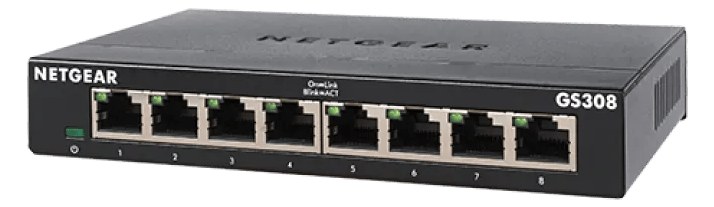
GS308The Netgear GS308 is another solid budget option for simple networking needs in a small audio rig. It provides eight gigabit ports in a metal desktop chassis that is compact enough to velcro inside a rack or place on a shelf. Like other unmanaged switches, it is plug-and-play with no configuration needed, making it ideal for basic device interconnection when you do not need advanced network management.View gear →
Placement is only the start. Builder checks space · depth · weight, power headroom, dependencies, and compatible signal paths around this exact catalog item.Open in Builder