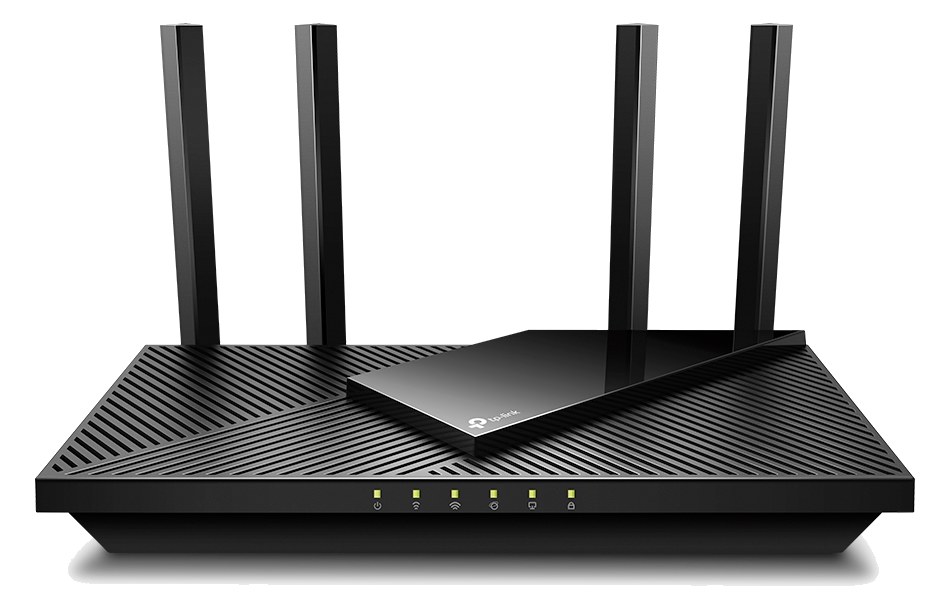
The TP-Link Archer AX21 is a budget-friendly WiFi 6 (AX1800) router that's become the default cheap pick for tablet-control rigs. Four gigabit LAN ports plus WiFi mean a console, computer, and tablet can all talk to each other without drama. Set it to a dedicated SSID for the rig and you've got a private network at every show.
01 · What it does—and what that changes in your rig.
Product overview
Start with the payoff, then work through how it functions, where it fits, and the details that change a real build.
The payoff
WiFi Router decisions, organized around the whole rig.
The Archer AX21 is the router you buy when you need a private wireless network for your rig and you don't want to spend a lot of money doing it. In practice, that means a dedicated SSID for your console's tablet remote, a wired connection to the console or a stage computer, and nothing else on the network competing for bandwidth. WiFi 6 (AX1800) gives it enough headroomThe margin between your normal level and where things clip — headroom is what absorbs the snare hit you didn’t see coming. for the kind of low-latencyThe delay between sound entering and leaving a digital system. IEM rigs fight to keep the whole chain down to a few milliseconds. control traffic that monitor and playback rigs actually generate — a few tablets pulling meter data and sending parameter changes is nowhere near stressing this hardware.
Documented outputs
00 destination connections
Documented inputs
1Based on documented inputs
Rack space
Outside rackPlan a shelf, tray, or stage position
TP-Link product panelOutside rack · 12W
Function
How it works in the path
Four gigabit LAN ports is the right number for most compact rigs: one to the console, one to a playback machine, one spare for a laptop at soundcheck, and you're done. Power draw sits between 12 and 18 watts depending on load, so it barely registers on your power budget — a single outlet on your conditioner handles it cleanly. At 0.5 kg and 130 mm deep, it lives on top of the rack lid or velcro'd to the back panel rather than occupying rack space, which the catalog record correctly flags. The catalog also notes it is rackmountable, but that requires a third-party shelf since it has no integral rack earsThe flanges that bolt gear to the rack rails. Desktop boxes without them need a shelf, tray, or drawer to live in the case..
Best fit
Where it earns its place in the system
This router belongs in a straightforward IEMIn-Ear Monitor — earpieces that replace floor wedges, feeding each player their own mix. The reason this whole rack exists. or playback rig where the network job is simple: one private SSID, a handful of devices, no IT department involved. If you're running a more complex show network — multiple consoles, DanteThe most common audio-over-network standard: dozens of channels of uncompressed digital audio down one ordinary Ethernet cable between Dante boxes. or AVBAudio Video Bridging — open network audio (MOTU, PreSonus) where the switch reserves bandwidth so streams can’t glitch. Milan is its pro profile. on the same infrastructure, or a venue integration that demands VLANVirtual LAN — slicing one physical switch into separate isolated networks, like keeping Dante away from lighting and guest WiFi. separation — the AX21's consumer-grade feature set will start showing its limits and you should be looking at a Cisco or Ubiquiti business-class access point instead. At $79 it is genuinely hard to beat for the use case it was built for, but know that use case clearly before you pack it.
In the rack
Details worth deciding before load-in.
Lock the SSID and password before the first rehearsal and don't put it on the venue's network — keep it an island. That single habit eliminates most tablet-control headaches on show day.
Velcro it to the inside lid or back wall of the rack case rather than leaving it loose on top; antenna orientation matters for range, and flat on a surface behind a lid is better than sliding around in a bay.
Plug it into a switched outlet on your power conditionerFilters venue AC, clamps surges, and gives the rack one tidy inlet. Not a voltage regulator and not a battery — just cleaner power. so you can cold-reboot it from the front of the rack without crawling behind gear — a router restart fixes more mysterious tablet dropoutsA brief audio gap when the radio link fails — the thing diversity, distros, and coordination all exist to prevent. than any other intervention.
Assign static IP addresses to every wired device on the LAN ports during your pre-production session, not at load-in. DHCPThe router service that hands out IP addresses automatically — rack networks often pin static addresses instead so gear always finds itself. conflicts at 3 PM on show day are avoidable and embarrassing.
02 · Know the whole path before you buy.
Signal path
Learn the route as a block diagram: source, product function, transport, and destination. Select any block to see what enters, what changes, and what leaves.
Interactive block diagramAuto-looping · hover, focus, or tap to hold a stage
Port-type signalProduct functionSystem boundary
Follow one signal from source to destination
Each block answers the same three questions: what arrives, what changes here, and what leaves.
01 · Source · selected
dc barrel
RJ45
01 · Source
1 documented input
dc barrel
Arrives as
1 documented input
Connector
dc barrel
Signal
power
03 · What this product asks of the rest of the system.
Compatibility
Treat connector names as the start of the check—not the answer. These are the boundaries that determine a complete working path.
Best fit · WiFi Router
Use it as wifi router tracked outside rack rails; follow the manufacturer’s mounting and form-factor guidance.
Plan the companion path
Complete the path with upstream and downstream gear that matches connector, direction, signal type, protocol, and wiring standard.
Connector boundary
Documented connectors: RJ45, dc barrel. Match connector, direction, and signal type—not shape alone.
04 · Every connector, grouped by job.
I/O ports
Switch the product view and the documented port inventory updates with it—hardware and data stay side by side.
Every connector, grouped by job.
Switch panels to keep the hardware view and the documented port list in sync.
Front panelRear panel
All documented ports for TP-Link Archer AX21 WiFi 6 Router
Port
Panel
Connector
Direction
Signal
Channels
WAN (RJ45)
rear
RJ45
bidirectional
data
—
LAN 1 (RJ45)
rear
RJ45
bidirectional
data
—
LAN 2 (RJ45)
rear
RJ45
bidirectional
data
—
LAN 3 (RJ45)
rear
RJ45
bidirectional
data
—
LAN 4 (RJ45)
rear
RJ45
bidirectional
data
—
Power (DC barrel)
rear
dc barrel
input
power
—
Showing 6 of 6 documented physical ports.
05 · Compare the decision, not just the price.
Alternatives
The rows are organized around fit, power, I/O, and system role so a cheaper unit cannot hide a more expensive workflow.
Archer AX21The TP-Link Archer AX21 is a budget-friendly WiFi 6 (AX1800) router that's become the default cheap pick for tablet-control rigs. Four gigabit LAN ports plus WiFi mean a console, computer, and tablet can all talk to each other without drama. Set it to a dedicated SSID for the rig and you've got a private network at every show.View gear →
GL-AXT1800 (Slate AX)The GL.iNet GL-AXT1800 is a pocket-sized WiFi 6 travel router that's become a favorite for fly-date musicians and engineers. Dual gigabit ports, OpenWRT firmware, and a small form factor that lives in a gig bag. Cheap insurance for tablet-control workflows when the venue WiFi is unreliable.View gear →
RAX50The Netgear Nighthawk RAX50 is a familiar consumer WiFi 6 router that punches well above its weight for tablet-control rigs. Four gigabit LAN ports and an aesthetically friendly design make it an easy "throw it on top of the rack" option for theaters and houses of worship.View gear →
06 · Resolve the questions that can change the purchase or build plan.
Planning questions
Short, source-backed answers surface rack fit, power, cabling, and connection details before they become surprises.
Where does the TP-Link Archer AX21 WiFi 6 Router live in a complete rig?
The catalog assigns it no rack units. Builder tracks it as non-rack gear; follow the manufacturer’s mounting, case, and form-factor guidance.
How much power does the TP-Link Archer AX21 WiFi 6 Router draw?
Typical draw is 12W and documented maximum draw is 18W.
What connections does the TP-Link Archer AX21 WiFi 6 Router have?
6 documented physical ports, including WAN (RJ45), LAN 1 (RJ45), LAN 2 (RJ45), LAN 3 (RJ45), LAN 4 (RJ45), Power (DC barrel).
07 · See this gear inside a complete system plan.
Builder preview
Builder keeps non-rack gear in the same bill of materials, budget, dependency, and connection plan as the rack-mounted system around it.Open in Builder