

Patch Bay

Neutrik NZP1RU-12 XLR Patch Panel

The Neutrik NZP1RU-12 provides a clean row of 12 XLR pass-throughs from front to rear panel, making it easy to present organized connections on the back of your rack while keeping the front accessible for patching. Neutrik connectors ensure reliable, road-worthy connections. This is essential infrastructure for any touring rack where you want quick, repeatable hookups at each venue.

Compare

Photos

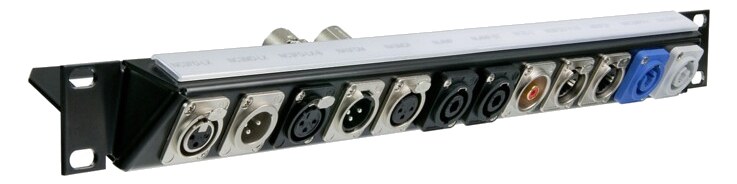
Manufacturer product photography — the drawn faceplate stays true to panel layout; these show the hardware itself.

Photo: NeutrikClick to zoom
Documented outputs
00 destination connections
Documented inputs
0Based on documented inputs
Rack space
1UBuilder checks available rail space
Power draw
0WVerified passive · no AC required
Catalog estimate
~$199Use retailer rows for current price and stock

01 · What it does—and what that changes in your rig.

Product overview

Start with the payoff, then work through how it functions, where it fits, and the details that change a real build.

The payoff

Patch Bay decisions, organized around the whole rig.

The NZP1RU-12 is infrastructure, not a feature — it's the panel that turns the back of your rack from a tangle of cables plugged directly into gear into a single, organized presentation point. Twelve XLR female jacks on the front pass straight through to twelve on the rear, all in a single rack unit at just 50mm deep. At every venue, the house snake, your personal sends, and your IEM returns all land in the same numbered jacks in the same order. That repeatability is what you're actually buying.

Documented outputs
00 destination connections
Documented inputs
0Based on documented inputs
Rack space
1UBuilder checks available rail space
NEUTRIK · NZP1RU-12
Neutrik product panel1U · 0W
Function

How it works in the path

Fifty millimeters of depth means this panel lives comfortably even in a shallow road case without fighting for space behind your wireless gear or personal mixers. At 0.9 kg it adds almost nothing to your carry weight. Because it's purely passive — no power draw whatsoever — it contributes zero noise and introduces no failure mode beyond a bent pin. The Neutrik connectors are the same chassis-mount hardware found across professional touring infrastructure, so latch engagement and pin contact are consistent and reliable through hundreds of plug cycles. Twelve channels covers a typical IEM rig cleanly: stereo mix outputs, a few aux sends, comms, and click — all terminated at the rear without crawling behind the rack mid-show.
Best fit

Where it earns its place in the rack

This panel belongs in any touring or fly-date rack where your cabling changes venue to venue but your internal signal flow doesn't. If your rig stays in a fixed install, the patch panel solves a problem you don't really have. If you're running more than twelve analog connections regularly, you'll want a second unit or a higher-count alternative — there's no expandability here, just a clean twelve. Engineers who run mostly digital snakes and only a handful of analog handoffs may find twelve more than enough; engineers on large broadcast or festival rigs with dense analog I/O may find it a starting point rather than a complete solution.

In the rack

Details worth deciding before load-in.

  • Label both front and rear jacks with the same numbering scheme before the first show — a P-touch or Dymo label on each port eliminates mispatches at load-in when someone else is plugging in the snake.
  • Use the rear connections as your permanent internal wiring and the front as your venue-facing patch points; coil and secure the rear pigtails so they never need to move again after initial rack build.
  • At 50mm deep, this panel can sit in the very top or bottom unit of a shallow case without protruding — keep it away from the middle of the rack where depth competition with power supplies or wireless receivers is highest.
  • Run a short female-to-female XLR turnaround on any unused front jacks during shows to protect the pins and signal that the channel is intentionally dark, not a patching mistake.

02 · Know the whole path before you buy.

Signal path

Learn the route as a block diagram: source, product function, transport, and destination. Select any block to see what enters, what changes, and what leaves.

Interactive block diagramAuto-looping · hover, focus, or tap to hold a stage
Port-type signalProduct functionSystem boundary
Follow one signal from source to destination

Each block answers the same three questions: what arrives, what changes here, and what leaves.

01 · Connection · selected
01 · Connection

12 bidirectional connections

XLR female

Connection
12 bidirectional ports
Connector
XLR female
Signal
analog audio

03 · What this product asks of the rest of the system.

Compatibility

Treat connector names as the start of the check—not the answer. These are the boundaries that determine a complete working path.

Best fit · Patch Bay

Use it when 1U and 50 mm of depth fit the case.

Plan the companion path

Complete the path with upstream and downstream gear that matches connector, direction, signal type, protocol, and wiring standard.

Connector boundary

Documented connectors: XLR female. Match connector, direction, and signal type—not shape alone.

04 · Every connector, grouped by job.

I/O ports

Switch the product view and the documented port inventory updates with it—hardware and data stay side by side.

Every connector, grouped by job.

Switch panels to keep the hardware view and the documented port list in sync.

Front panel
NEUTRIK · NZP1RU-12
Rear panel
XLR 1XLR 2XLR 3XLR 4XLR 5XLR 6XLR 7XLR 8XLR 9XLR 10XLR 11XLR 12
All documented ports for Neutrik NZP1RU-12 XLR Patch Panel
PortPanelConnectorDirectionSignalChannels
XLR 1bothXLR female bidirectionalanalog audio—
XLR 2bothXLR female bidirectionalanalog audio—
XLR 3bothXLR female bidirectionalanalog audio—
XLR 4bothXLR female bidirectionalanalog audio—
XLR 5bothXLR female bidirectionalanalog audio—
XLR 6bothXLR female bidirectionalanalog audio—
XLR 7bothXLR female bidirectionalanalog audio—
XLR 8bothXLR female bidirectionalanalog audio—
XLR 9bothXLR female bidirectionalanalog audio—
XLR 10bothXLR female bidirectionalanalog audio—
XLR 11bothXLR female bidirectionalanalog audio—
XLR 12bothXLR female bidirectionalanalog audio—

Showing 12 of 12 documented physical ports. Scroll to review the remaining rows.

05 · Compare the decision, not just the price.

Alternatives

The rows are organized around fit, power, I/O, and system role so a cheaper unit cannot hide a more expensive workflow.

Compare
Neutrik NZP1RU-12 XLR Patch Panel
Fit📐 1U📐 1U📐 2U📐 2U
Power⚡ 0W⚡ 0W⚡ 0W⚡ 0W
Weight⚖️ 2.0 lb⚖️ 2.6 lb⚖️ 4.0 lb⚖️ 5.1 lb
I/O🔌 12🔌 16🔌 24🔌 32
Estimate💵 ~$199💵 ~$299💵 ~$449💵 ~$599
Deep diveCurrent selectionFull comparison →Full comparison →Full comparison →

06 · Resolve the questions that can change the purchase or build plan.

Planning questions

Short, source-backed answers surface rack fit, power, cabling, and connection details before they become surprises.

How will the Neutrik NZP1RU-12 XLR Patch Panel affect rack fit and case depth?

It occupies 1U. Its documented depth is 50 mm.

How much power does the Neutrik NZP1RU-12 XLR Patch Panel draw?

It is verified passive and requires no AC power.

What connections does the Neutrik NZP1RU-12 XLR Patch Panel have?

12 documented physical ports, including XLR 1, XLR 2, XLR 3, XLR 4, XLR 5, XLR 6.

07 · See this unit inside a real rack plan.

Builder preview

Placement is only the start. Builder checks space · depth · weight, power headroom, dependencies, and compatible signal paths around this exact catalog item.Open in Builder
NZP1RU-12 XLR Patch Panel positioned in a rack planA simplified plan shows the unit taking 1 rack units, with its documented connection path continuing to a planned destination.NeutrikNZP1RU-12CONNECTED GEARnext signal destination1U · 50 mm deep

08 · Related gear, in the order you may need it.

Planning guides for patch bay systems.