Audio Interface

Universal Audio Volt 476

The UA Volt 476 brings a taste of Universal Audio's analog heritage to a budget interface, with a built-in 76-style compressor circuit on the inputs that adds analog warmth during tracking. The six outputs are useful for routing separate feeds to IEM transmitters or monitoring, giving you more flexibility than typical desktop interfaces. A solid option for musicians who want quality UA conversion without the Thunderbolt-only Apollo commitment.

Compare

Photos

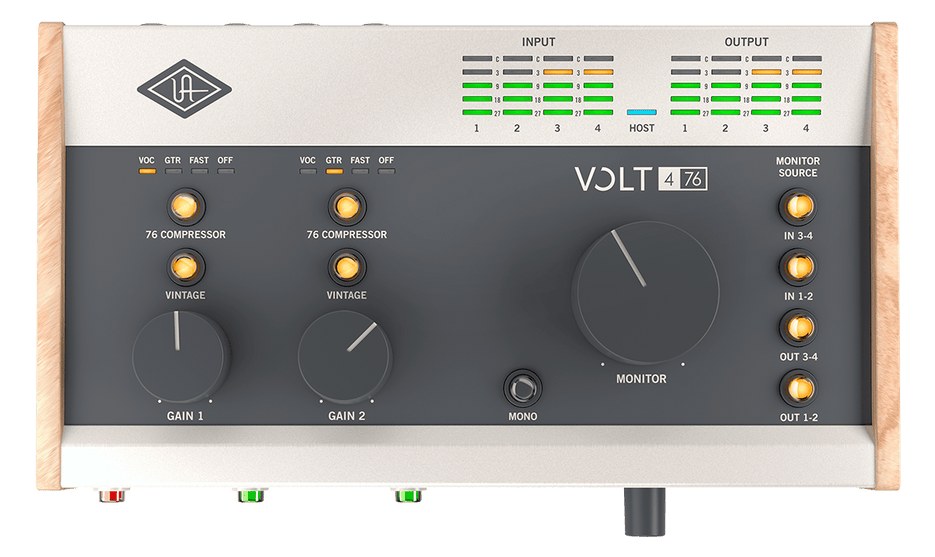
Manufacturer product photography — the drawn faceplate stays true to panel layout; these show the hardware itself.

Photo: Universal AudioClick to zoom
Documented outputs
33 destination connections
Documented inputs
5Based on documented inputs
Rack space
1U · half-rackBuilder checks available rail space
Power draw
5W8W documented maximum
Catalog estimate
~$399Use retailer rows for current price and stock

01 · What it does—and what that changes in your rig.

Product overview

Start with the payoff, then work through how it functions, where it fits, and the details that change a real build.

The payoff

Audio Interface decisions, organized around the whole rig.

The Volt 476 is Universal Audio's half-rack USB audio interface — four inputs, six outputs, and a hardware 76-style compressor circuit built into the input stage. In a live rig context, it sits at the intersection of playback and monitoring: you can feed click and reference tracks from a laptop over USB-C, route discrete outputs to IEM transmitters or a monitor console, and still have two XLR mic inputs available for talkback or a reference vocal. It's not an Apollo, but it carries genuine UA conversion in a box that weighs 700 grams.

Documented outputs
33 destination connections
Documented inputs
5Based on documented inputs
Rack space
1U · half-rackBuilder checks available rail space
VOLT 4 76
Universal Audio product panel1U · half-rack · 5W
Function

How it works in the path

The six outputs are what make the 476 interesting at show time rather than just at home. Two TRS line outs give you a stereo main feed, but the additional outputs routed inside the UA software let you split stems or send a separate headphone cue without a dedicated headphone amp in the chain. The 76 compressor mode is a one-button hardware circuit — useful for taming a hot talkback mic or adding glue to a reference track, though it's a fixed character, not a fully parametric tool. Power draw tops out at 8W, so it won't stress a standard conditioned strip. The catch is the form factor: this is a desktop unit, and getting it into a rack requires a half-rack shelf.

Best fit

Where it earns its place in the rack

This belongs in a compact playback or hybrid musician rig where the operator wants UA's conversion quality, needs more than a stereo out, and isn't ready to commit to the Thunderbolt-dependent Apollo ecosystem. It's a strong fit for a keyboard player's personal rack or a small IEM playback rig feeding two or three transmitters. It's not the right call for a dedicated monitor engineer needing multichannel analog returns, for anyone requiring ADAT expansion, or for a rig where rack real estate is genuinely scarce — a half-rack shelf still costs you a full 1U.

In the rack

Details worth deciding before load-in.

  • Pair it with a half-rack shelf that has rear cable management — the 175mm depth is shallow, but USB-C and six TRS connectors crowding the back of a shelf get messy fast.
  • If you're feeding two IEM transmitter inputs from the line outs, label the TRS cables at both ends before load-in; the output jacks are close together and easy to swap in low light.
  • The 76 compressor engages per-input, not globally — use it on your talkback XLR input to catch peaks without touching your playback outputs.
  • Bus power from USB-C can vary by laptop port; if you hear noise at idle, add a short USB-C inline power isolator or run from a powered USB hub off a clean conditioned strip rather than directly from the computer.

02 · Know the whole path before you buy.

Signal path

Learn the route as a block diagram: source, product function, transport, and destination. Select any block to see what enters, what changes, and what leaves.

Interactive block diagramAuto-looping · hover, focus, or tap to hold a stage
Port-type signalProduct functionSystem boundary
Follow one signal from source to destination

Each block answers the same three questions: what arrives, what changes here, and what leaves.

01 · Source · selected
01 · Source

5 documented inputs

XLR/TRS combo + ¼-inch TRS

Arrives as
5 documented inputs
Connector
XLR/TRS combo + ¼-inch TRS
Signal
analog audio

03 · What this product asks of the rest of the system.

Compatibility

Treat connector names as the start of the check—not the answer. These are the boundaries that determine a complete working path.

Best fit · Audio Interface

Use it when 1U · half-rack and 175 mm of depth fit the case.

Companion gear required

Plan Penn Elcom 1U Half-Rack Shelf before treating this path as complete.

Connector boundary

Documented connectors: XLR/TRS combo, ¼-inch TRS, usb c, dc barrel. Match connector, direction, and signal type—not shape alone.

04 · Every connector, grouped by job.

I/O ports

Switch the product view and the documented port inventory updates with it—hardware and data stay side by side.

Every connector, grouped by job.

Switch panels to keep the hardware view and the documented port list in sync.

Front panel
VOLT 4 76
Rear panel
Universal AudioVolt 476
All documented ports for Universal Audio Volt 476
PortPanelConnectorDirectionSignalChannels
Mic/Line/Inst In 1 (combo)rearXLR/TRS combo inputanalog audio—
Mic/Line/Inst In 2 (combo)rearXLR/TRS combo inputanalog audio—
Line In 3 (TRS)rear¼-inch TRS inputanalog audio—
Line In 4 (TRS)rear¼-inch TRS inputanalog audio—
Line Out 1 (TRS)rear¼-inch TRS outputanalog audio—
Line Out 2 (TRS)rear¼-inch TRS outputanalog audio—
Headphones (front, 1/4")front¼-inch TRS outputanalog audio—
USB-Crearusb c bidirectionaldata—
5V DC Inreardc barrel inputpower—

Showing 9 of 9 documented physical ports.

05 · Compare the decision, not just the price.

Alternatives

The rows are organized around fit, power, I/O, and system role so a cheaper unit cannot hide a more expensive workflow.

Compare
Universal Audio Volt 476
Universal Audio Apollo x16 Gen 2
Universal Audio Apollo x16D (Dante)
Universal Audio Volt 876
Fit📐 1U · half-rack📐 1U📐 1U📐 1U
Power⚡ 5W⚡ 30W⚡ 30W⚡ 15W
Weight⚖️ 1.5 lb⚖️ 11.9 lb⚖️ 9.0 lb⚖️ 5.5 lb
I/O🔌 9🔌 11🔌 7🔌 7
Estimate💵 ~$399💵 ~$3,799💵 ~$2,999💵 ~$999
Deep diveCurrent selectionFull comparison →Full comparison →Full comparison →

06 · Resolve the questions that can change the purchase or build plan.

Planning questions

Short, source-backed answers surface rack fit, power, cabling, and connection details before they become surprises.

How will the Universal Audio Volt 476 affect rack fit and case depth?

It occupies 1U · half-rack. Its documented depth is 175 mm.

How much power does the Universal Audio Volt 476 draw?

Typical draw is 5W and documented maximum draw is 8W.

What connections does the Universal Audio Volt 476 have?

9 documented physical ports, including Mic/Line/Inst In 1 (combo), Mic/Line/Inst In 2 (combo), Line In 3 (TRS), Line In 4 (TRS), Line Out 1 (TRS), Line Out 2 (TRS).

07 · See this unit inside a real rack plan.

Builder preview

Placement is only the start. Builder checks space · depth · weight, power headroom, dependencies, and compatible signal paths around this exact catalog item.Open in Builder
Volt 476 positioned in a rack planA simplified plan shows the unit taking 1 rack units, with its documented connection path continuing to a planned destination.Universal AudioVolt 476CONNECTED GEARnext signal destination1U · 175 mm deep

08 · Related gear, in the order you may need it.

Planning guides for audio interface systems.